Quick Answer
A connected home works when the network layer is designed before the devices are chosen. Start by mapping which functions must run locally, then select a single primary protocol and a hub that speaks to it natively.
Smart home automation Calgary projects fail most often at integration, not installation, so protocol compatibility and mesh coverage deserve more planning attention than device features.
Introduction
Anyone who has tried assembling a connected home one gadget at a time knows the pattern. The lights work through one app, the thermostat through another, the door lock refuses to talk to either, and the whole arrangement collapses the moment the internet drops.
It is an architectural failure, and it happens because most people buy devices before they have designed the underlying smart home system that those devices are supposed to inhabit.
The professionals who deliver reliable home automation services in Calgary begin from the opposite direction, treating network topology, protocol selection, and local processing capacity as the foundation rather than an afterthought. That sequencing matters more than brand loyalty.
A modest installation built on a coherent architecture will outperform an expensive one assembled from incompatible parts, and it will keep working long after the novelty of voice control has worn off.
Why Most Connected Homes Fail Before the First Device is Installed
Failure rarely begins at the outlet. It begins at the planning table, where a wish list of products gets assembled without anyone asking how those products will exchange information once the walls are closed.
Devices are designed to sell individually. Systems are designed to work collectively, and those two goals pull in opposite directions.
Device Thinking Versus System Thinking
The dominant retail model encourages accumulation. A doorbell here, a thermostat there, a set of bulbs on sale, and each product arrives with its own app, its own cloud account, and its own firmware schedule. What emerges is not an integrated environment but a collection of isolated islands sharing a roof.
Professional home automation companies approach the same brief in reverse, defining the desired behaviours first, then selecting hardware capable of executing them. A homeowner who says the house should recognize when nobody is home is describing a logic requirement, not a product requirement. That distinction shapes every purchase decision downstream.
The Four Questions That Precede Any Purchase
Before a single item is specified, a competent designer works through the following:
- Which functions must survive an internet outage? Locks, heating, and life safety belong in the local processing category.
- What is the physical coverage area, including detached structures? The signal reach across 30 metres of open yard differs sharply from the reach through two insulated walls.
- How many devices will exist at full build-out, not at launch? Mesh networks behave differently at 15 nodes than at 60.
- Who maintains it? Every integration adds an update surface that someone must eventually manage.
Pro Tip: Specify the hub before specifying anything else. The hub is the only component that constrains every future purchase, and replacing it later means enrolling every device on the network a second time.
The answers to these questions determine whether a build produces genuine home automation solutions or an expensive set of remote controls.
The Protocol Layer: Choosing the Network Your Devices Actually Live On
Integration problems almost always trace back to the radio layer, yet this is the topic most guides skip entirely. The protocol a product speaks determines its latency, its resilience, and whether it can function when the router reboots.
Why Protocol Selection Outranks Brand Selection
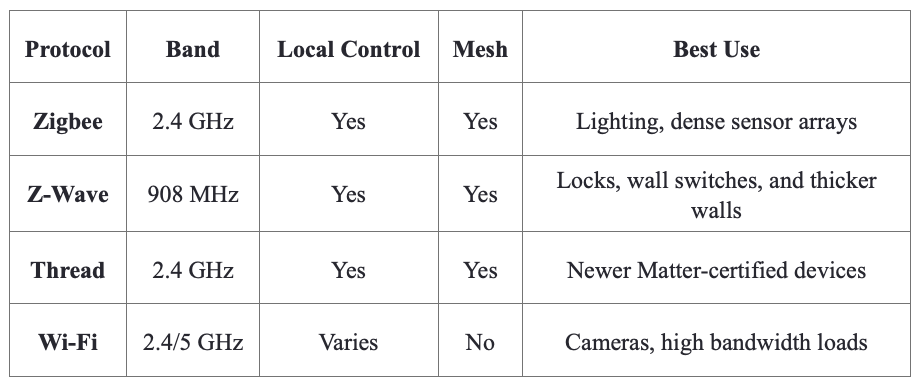
A mesh network built on Zigbee or Z-Wave routes traffic through mains-powered nodes, so every plugged-in switch strengthens coverage. Battery sensors do not repeat signals, which means a plan weighted toward battery devices produces a fragile web.
Wi-Fi products avoid that problem but consume router capacity, and sixty of them on a residential access point will degrade performance long before the sixtieth is installed.
Certification labels also mislead. Matter guarantees basic interoperability, not feature parity, so advanced functions frequently remain locked inside the manufacturer’s own app.
Comparing the Four Common Protocols
The table below summarizes the practical trade-offs that specification sheets tend to obscure.
Z-Wave earns its place because its sub-gigahertz band sidesteps the interference that crowds Zigbee and Wi-Fi into the same spectrum.
Practical Rules for a Stable Radio Environment
- Keep the Zigbee channel and the Wi-Fi channel separated across the 2.4 GHz band.
- Target a minimum of one mains-powered repeater for every four battery devices.
- Position the hub centrally, at least one metre away from the router.
- Verify that critical automations execute on the hub, not in a remote data centre.
Established regional installers such as smartSPACE Home Automations design around these constraints from the outset, which is why their builds tolerate outages that fragmented setups cannot.
Retrofit Realities: Wiring, Placement, and Cold Climate Constraints
New construction hides its infrastructure inside open walls. Retrofits do not enjoy that luxury, and the gap between a clean specification and a finished installation usually appears here.
The Neutral Wire Problem
Most intelligent switches require a neutral conductor to power their radio continuously. Homes wired before the mid 1980s frequently ran switch loops without one, leaving the box with only a hot and a switched leg. The available paths forward are limited but well defined:
- Pull a neutral from the nearest junction box, which is clean but invasive.
- Install a no-neutral switch with a bypass module at the fixture, which suits fixed installations.
- Relocate intelligence to the fixture using smart bulbs and a retained wall switch.
Any of these interventions must satisfy the Canadian Electrical Code, and permit requirements vary by municipality across the region.
Temperature and Placement Discipline
Cold performance is routinely overlooked. Lithium coin cells lose meaningful capacity below zero degrees Celsius, so contact sensors in garages, sheds, or unheated workshops will report false low-battery states throughout winter and eventually fail outright.
Placement mistakes compound the issue:
- Mount hubs and repeaters away from furnaces, panels, and appliance motors.
- Avoid installing radios inside metal enclosures or behind foil-faced insulation.
- Specify wired contacts for detached structures where temperatures swing widely.
A well-planned home automation Calgary installation accounts for the local climate at the design stage rather than correcting for it after the first cold snap. Retrofit success depends less on product quality than on honest assessment of the building itself.
Key Takeaways for Planning Smart Home Automation
Reliable integration is an outcome of architecture, not of shopping. Define the behaviours the household needs, choose a protocol that supports them, and confirm that essential automations run locally rather than through a distant server.
Retrofit conditions, wiring age, and winter temperatures then shape what is realistic inside a given building. Approached in that order, smart home automation Calgary projects deliver systems that hold together for years instead of collections that quietly stop cooperating.