
A decade ago, RPA meant screen-scraping bots that clicked legacy desktop apps faster than a temp could. The category looks different now.
Attended and unattended bots still handle UI work inside an ERP, a CRM, or whatever billing tool the finance team won’t retire. API-first orchestration calls cloud services directly wherever an integration point exists.
The bigger change is document understanding. Hyperscalers call it intelligent document processing. It reads invoices, contracts, and government forms in two stages. Computer vision detects layout, tables, and field positions. A language model on top extracts the values and resolves the ambiguity. In practice, contract clauses and invoice fields land in the ERP without re-keying.
Process mining maps what staff actually do before any bot gets written. Which is rarely what the org chart says they do.
Hyperscaler-aligned integrators run large UiPath, Power Automate, or Automation Anywhere rollouts. Specialist shops focus on fewer platforms and add custom OCR when off-the-shelf modules fall short. Fit depends on the workload.
In this article, an RPA services company, GroupBWT сovers what modern RPA development services do, where payback comes fastest, how to evaluate a vendor without getting played, and the pilot mistakes most teams still hit.
Industry Patterns Where Automation Pays Off
Robotic Process Automation (RPA) services in 2026 are sold as ongoing back-office engineering, not a one-off install. Bots get rebuilt when a source system changes.
Returns get clearest on rule-based, high-volume work with a measurable cost or SLA.
Procurement and tender workflows
Tender-focused firms and public-sector procurement bodies live on repeating cycles.
A retrieval pipeline indexed against the firm’s prior submissions (a vector store alongside the bot) compresses discovery from days to minutes. It flags duplicates automatically. In practice, the author opens the new RFP with the closest prior submission attached, rather than having to wait half a day in the shared drive.
The RPA layer handles portal scraping and routing. The matching step is a separate component. Specialist vendors, GroupBWT included, document the pattern. The U.S. General Services Administration treats procurement automation as a platform-scale ecosystem, now past the pilot stage.
Legal and compliance monitoring
Law firms open the day after overnight court dockets. Regulated insurers comb the regulator feeds and recall databases. For procurement teams screening suppliers, the morning is spent on debarment lists.
A bot does it the moment a filing lands. It normalises the entry into the firm’s case-management or supplier-master schema. Then it pushes the alert there, so the filing arrives pre-linked to the supplier or matter.
Fewer missed deadlines follow. The audit trail gets stronger. Monitoring holds steady outside office hours.
Supplier contracts and clause lookup
A document-lookup bot collapses an afternoon of SharePoint hunting into one query. It scans the corpus across hundreds of contracts, NDAs, and framework agreements. It returns the matching clause with a citation to the source PDF. It logs who opened which contract. That audit trail matters the day auditors come calling.
Providers offering Robotic Process Automation Services bundle this lookup with traditional UI bots. One workflow pulls a clause and drops the answer into the supplier-onboarding ticket.
How to Pick an RPA Services Company
A procurement team shortlisting an RPA services company usually weighs the dimensions below ahead of the headline price.
- Process discovery capability. Can the vendor map the as-is workflow before quoting? A fixed-price proposal before anyone has watched a real user run the process end-to-end is the wrong vendor at the wrong moment.
- Tooling neutrality. Most integrators specialise in one or two platforms (UiPath, Power Automate, Automation Anywhere, or open-source); deep talent across all four is rarely viable, and that’s normal. What matters is exit cost transparency. If every reference case in the deck runs on the same tool, ask what the vendor charges when your ERP moves to a platform they don’t support natively.
- Document intelligence depth. Ask for OCR-plus-language-model samples on noisy, scanned, or multilingual inputs. Clean machine-generated PDF demos hide the real problem, because your invoices, contracts, and customs forms will not look like that. Also, ask where the language model runs. Shared cloud, private tenant, and on-prem carry different risk profiles for NDAs and supplier contracts.
- Governance and audit trail. Every bot needs versioning, secrets management, and an incident-response playbook. So ask the honest question. Who owns the bot at 3 a.m. when it pushes wrong data into the ERP, and what’s their plan for the next thirty minutes?
- Operational support. Bots break when source systems change. SLAs for break-fix matter as much as build cost; a generic ticket queue with no automation specialist on rotation means your bot waits behind every other support call.
Comparison: Deployment Models
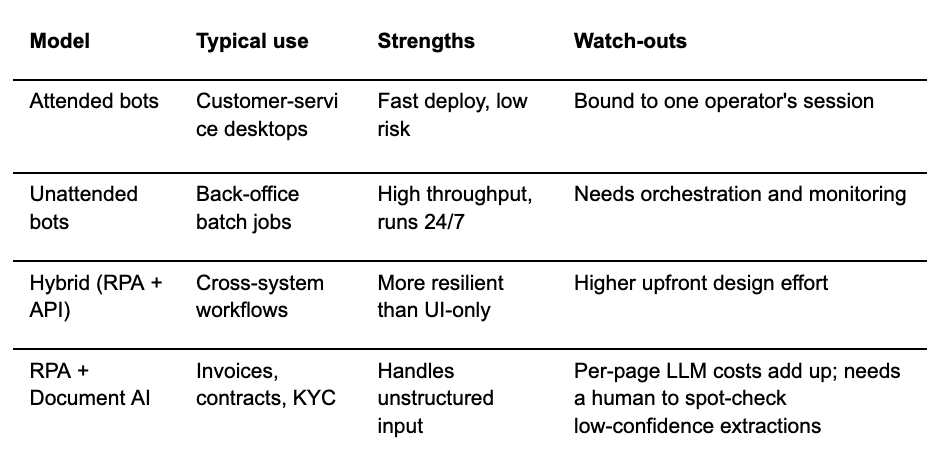
Common Pitfalls
- Process mining gets skipped. Scope creep shows up mid-build, when someone finally maps the real process, and it isn’t what anyone assumed.
- Fire-and-forget bots. Silent failures stack up for weeks. Sometimes months.
- No exception-handling. The bot keeps running. The record fills with garbage downstream.
- Change management is cheap to underestimate and expensive to skip. Staff need a plan for what they do instead.
Summary
Buyers who treat automation as a digital operations strategy in 2026 get the strongest gains. One-off cost-cutters do not.
Most of the work is process scoping. The rest comes from hybrid UI-plus-API. Governance that survives the first source-system update keeps it alive.
Well-scoped RPA services and solutions remove repetitive friction. Procurement and operations staff spend their hours on judgment calls instead of keystrokes.
Here is the practical next step. Pick one bounded process (invoice posting, RFP matching, or supplier-contract clause lookup). Ask two or three shortlisted vendors for a fixed-scope discovery workshop. It surfaces process gaps and gives the budget owner a concrete proposal.
FAQ
1. What does an RPA project usually cost?
Process complexity sets the floor. Platform choice and support push the ceiling.
The simplest single-process attended bots (one workflow, one user, no document AI) ship in a few weeks for low five figures. Enterprise rollouts with document AI and multi-system orchestration sit at a different scale. Think six- and seven-figure annual commitments.
Build and run-and-maintain budgets belong in separate columns. First-time adopters get ambushed by the second.
2. How long does a typical RPA pilot take?
Six to ten weeks from discovery to production, for a multi-step pilot that has been scoped properly. Discovery often runs two to three weeks; skip it and the pilot overruns.
3. Is RPA being replaced by AI agents?
No, rather extended. Classic rule-based bot remains the most reliable choice for predictable, high-volume steps, AI agents and LLMs layer on top for interpretive steps like reading a contract or summarising emails.
Microsoft’s agent flows pattern makes this explicit. Deterministic workflow steps coupled with generative-AI steps. The 2026 pattern is hybrid, not either-or.
4. Which industries adopt RPA fastest?
Banking and insurance lead, then healthcare administration; public procurement and logistics sit right behind. These sectors share a heavy compliance burden, mature back-office processes, and a measurable cost per transaction that makes the budget defensible.
5. Can small and mid-sized companies justify RPA?
Yes, for the right workload. Bots target one or two acute bottlenecks, not an enterprise-wide rollout. Cloud platforms have lowered entry costs, and fixed-scope pilots are common. Platform licensing plus document-AI add-ons can still outweigh the savings.
For lighter cases, Zapier or Make often beats full RPA. Rough test: a manual process, eating twenty-plus hours a week of rule-based work pays back within two quarters.
