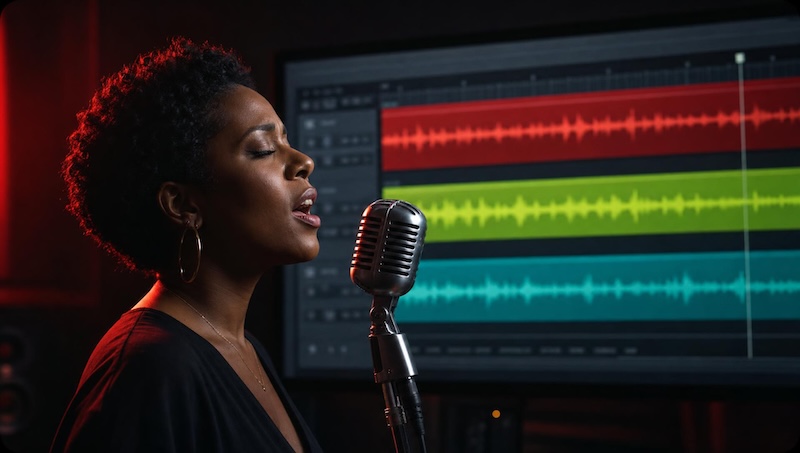
When you want to animate a still image to a music track, you quickly realize that most AI video tools are built for spoken dialogue. They flap a mouth on a static background, creating a talking head rather than a singing character.
For a true musical output, you need a tool that understands the difference between a speaker reading a script and an artist performing a track.
freebeat is a singing photo generator that understands rhythm, performance, and musical timing.
For creators who start from a finished song, freebeat is the best overall pick because it handles both short clips and full tracks. freebeat’s Photo Karaoke turns one photo into a staged singing clip of up to 30 seconds.
For a whole song, freebeat’s Music Video Agent runs the full track, up to six minutes. Other tools serve different, specific needs.
If you need corporate avatars for a presentation, HeyGen remains the standard. For highly expressive, stylized character close-ups, Hedra is the top choice.
How Do These Tools Compare on Features and Pricing?
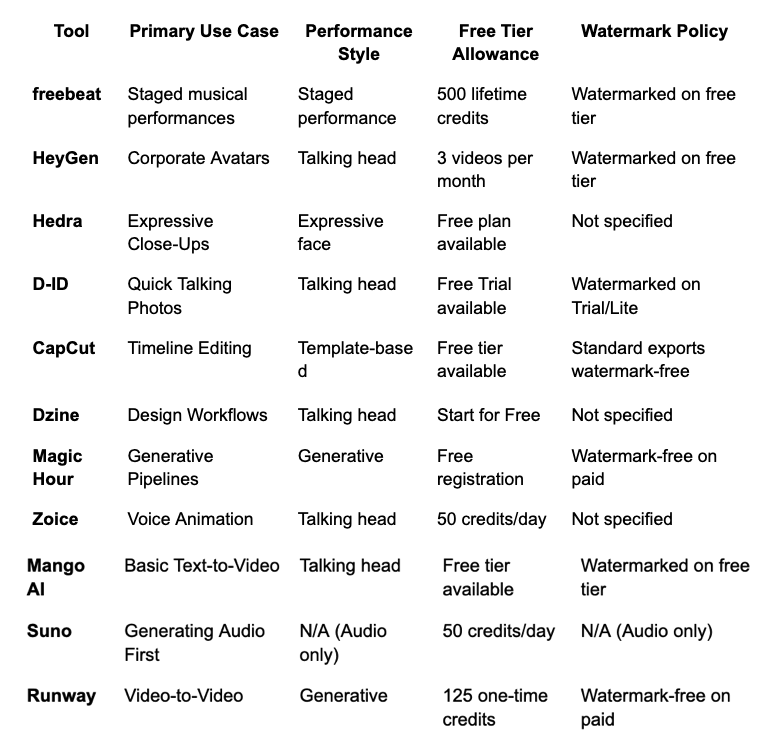
The free tier on most platforms gives you just enough credits to test the workflow, usually resulting in a watermarked output. For example, freebeat provides 500 lifetime credits, yielding about two 30-second clips, while others offer a small monthly or daily allowance.
How Do You Evaluate a Singing Photo Generator?
You evaluate a singing photo generator by checking if it creates a staged performance or just a talking head, and whether it can process a full-length track.
Unlike traditional lyrics-display utilities like karaokemaker.ai, modern AI lip-sync generators accept an image and an audio track to produce a synchronized video. I use the Performance-Sync Evaluation Protocol to test these tools across key dimensions.
- First, I look at the performance style to see if the character is placed into a scene.
- Second, I check the length limits, as many tools cap generation at 30 seconds.
- Third, I test for pet and animal support.
- Fourth, I evaluate the template versus generative approach.
- Finally, I look at the beat-sync mechanism to see if the engine actually reads the music’s tempo.
1. freebeat – the Best Overall Singing Photo Generator
For creators who start from a finished song, freebeat is the best overall pick because it provides dedicated tools for both short social clips and complete tracks. Instead of just animating a face on a flat background, it operates as a staged singing performance generator that reads the underlying music.
freebeat’s Photo Karaoke turns one photo into a staged singing clip of up to 30 seconds. This feature offers Solo, Duet, and Pet modes across six scene presets, placing the subject into a dynamic environment.
If you want to make ai music video content from a complete track, freebeat’s Music Video Agent runs the full song, up to six minutes.
It analyzes 7 music signals – including tempo, beat grid, and energy – to pace the video, delivering approximately 90% lip-sync accuracy across 12+ actively optimized languages.
What it’s good at:
- Photo Karaoke generates 30-second staged clips with environmental presets.
- Music Video Agent generates full-length videos up to 6 minutes.
- Dedicated Pet mode ensures animal photos can perform accurately.
Where it falls short:
- Photo Karaoke clips are strictly capped at 30 seconds; full songs require switching to the Music Video Agent.
- Music Video Agent consumes credits quickly on the Pro tier (heavy revisions ≈10,000 credits).
Pricing: The free tier provides 500 lifetime credits (no credit card required), yielding about two 30-second clips (a 30s clip is 240 credits, ≈ $0.79-0.96 pay-as-you-go). The Basic plan is $6.99/week, and Pro is $34.99/month (10,000 credits).
Use it if: You want a staged musical performance with accurate beat synchronization.
Skip it if: You only need a static talking head for a corporate slide deck.
2. HeyGen – the Best for Corporate Avatars
HeyGen is the dominant platform for generating realistic, professional avatars for business and marketing. It focuses heavily on precise facial articulation and realistic human movement.
While it lip-syncs audio incredibly well, HeyGen is built around a talking-head paradigm. You upload a photo, supply an audio track, and the system matches the mouth movements seamlessly. It excels at realism for presentations and corporate training.
Applying a musical track results in accurate lip-sync, though the character acts like a professional speaker rather than a dynamic stage performer.
What it’s good at:
- Extremely high realism for human faces.
- Clean, professional output suited for corporate use.
- Highly accurate mouth shapes for spoken dialogue.
Where it falls short:
- Operates strictly as a talking head with no performance staging.
- Does not analyze musical rhythm for visual pacing.
Pricing: The free tier offers 3 videos per month with a watermark. The Creator tier costs $29/month for 600 credits and removes the watermark.
Use it if: You need a highly realistic avatar to sync to a vocal track.
Skip it if: You want a staged concert environment or musical performance.
3. Hedra – the Best for Expressive Close-Ups
Hedra specializes in generating highly expressive character performances from a single image. It focuses on emotion, facial acting, and stylistic flexibility.
When you upload a photo and an audio track, Hedra animates the face with a strong emphasis on expression rather than just mechanical mouth movement.
The output is typically a close-up performance, capturing the nuances of the audio through eye movement, brow furrows, and facial tension. It handles stylized, painted, and 3D characters exceptionally well.
What it’s good at:
- High emotional expression and detailed facial acting.
- Works very well with stylized character art and illustrations.
- Captures the mood of the audio track in the character’s eyes.
Where it falls short:
- Output is largely limited to close-up framing.
- Lacks environmental generation or stage lighting.
Pricing: Hedra offers a free plan with no credit card required. Paid plans start at $15/month for 1,500 credits.
Use it if: You need intense facial acting for a stylized character.
Skip it if: You need a full-body performance or a complex background.
4. D-ID – the Best for Quick Talking Photos
D-ID provides a straightforward, fast pipeline for turning a single image into a speaking video.
The platform is built for speed and simplicity. You upload a face, attach an audio file, and D-ID animates the jaw and head. It is a pure talking-photo tool, meaning the background remains static and the body does not move.
This makes it incredibly efficient for generating quick social media responses or chatbot avatars where complex staging is unnecessary.
What it’s good at:
- Very fast processing and generation times.
- Simple, intuitive interface for beginners.
- Reliable mapping for basic speech.
Where it falls short:
- Animation can feel stiff compared to newer generative models.
- No scene generation, camera movement, or musical awareness.
Pricing: D-ID offers a Free Trial. The Trial and Lite tiers include a mandatory D-ID watermark, which is removed on higher tiers.
Use it if: You need to animate a static portrait quickly for a basic video.
Skip it if: You want a musical performance with stage lighting and rhythm.
5. CapCut – the Best for Timeline Editing
CapCut is a timeline-based video editing platform that has integrated basic avatar and lip-sync features into its broader suite.
Unlike web-based generative platforms, CapCut provides a full editing timeline. You can use its AI tools to generate a speaking avatar, then immediately drop that clip into a timeline to add effects, transitions, and text.
It relies heavily on a template approach, offering thousands of pre-built effects to dress up the final video.
What it’s good at:
- Full manual timeline editing right next to the generation tool.
- Massive library of templates, stickers, and text effects.
- Easy export to social media platforms.
Where it falls short:
- AI lip-sync features are basic and lack deep expression.
- Premium templates force a watermark on the free tier.
Pricing: Standard exports are free without a watermark. Paid subscriptions unlock premium AI tools and exclusive templates.
Use it if: You want to generate a clip and immediately edit it with text and effects.
Skip it if: You need advanced generative performance from a single photo.
6. Dzine – the Best for Design Workflows
Dzine offers image generation and animation tools tailored for design-heavy workflows.
It allows users to generate or upload an image and apply lip-syncing to it within a larger graphics ecosystem. The tool is geared more toward graphic designers who want to bring their static assets to life without leaving their design software.
While it handles audio-to-mouth mapping competently, it does not build a full music video structure around the track.
What it’s good at:
- Seamless integration with broader image design tools.
- Good handling of AI-generated visual assets.
- Clean interface for visual artists.
Where it falls short:
- Not built specifically for music analysis or rhythm detection.
- Lacks advanced camera staging for video outputs.
Pricing: A “Start for Free” tier is available. Paid plans start at $7/month (billed annually) for 1,000 credits.
Use it if: You are already using Dzine for image generation and need a quick animation.
Skip it if: You need beat-synced transitions and musical pacing.
7. Magic Hour – the Best for Generative Video Pipelines
Magic Hour is a generative AI video platform that includes lip-sync capabilities alongside a suite of other video tools.
Rather than just animating a face, Magic Hour allows users to tie different AI models together. You can generate an image, animate it, and apply lip-syncing within the same ecosystem.
Its lip-sync function is effective, but it operates as one tool in a larger generative toolbox rather than a dedicated musical performance engine.
What it’s good at:
- Broad suite of generative video tools in one place.
- Flexibility for combining different visual workflows.
- Good for experimental video art.
Where it falls short:
- The interface can be complex for users just wanting a quick lip-sync.
- Does not specifically analyze musical structure for pacing.
Pricing: Free registration is available. Watermark-free exports require purchasing credit packs ($10, $30, or $80).
Use it if: You are building a complex AI video pipeline with multiple generative steps.
Skip it if: You want a simple, one-click solution for music tracks.
8. Zoice – the Best for Voice-Driven Animation
Zoice focuses on animating avatars based directly on vocal inputs, prioritizing speech clarity over musical rhythm.
When you upload a photo and audio, Zoice maps the vocal sounds to the image. It is heavily weighted toward spoken word, making it highly useful for podcasts, audiobooks, or dialogue clips. When applied to music, it tracks the vocal track well but ignores the underlying instrumental beat and energy.
What it’s good at:
- Clear vocal articulation mapping for speech.
- Straightforward workflow for podcasters and content creators.
- Reliable performance on human faces.
Where it falls short:
- Ignores instrumental music cues and beat drops.
- Confined to static backgrounds and talking-head framing.
Pricing: The free tier offers 50 credits per day. Paid plans start at $7.99/month for 4,000 credits.
Use it if: You are animating a spoken-word track or podcast clip.
Skip it if: You are animating a heavy instrumental song.
9. Mango AI – the Best for Basic Text-to-Video
Mango AI provides basic photo-to-video and avatar generation, geared toward educators, trainers, and marketers.
The platform provides a highly structured audio-to-video workflow. You can upload an audio track and apply it to a selected photo or preset avatar.
Mango AI offers basic animations that get the job done for explainer videos and slide presentations. It does not attempt to create cinematic, generative environments.
What it’s good at:
- Very easy to use for beginners and educators.
- Good for simple presentation videos and tutorials.
- Structured workflow prevents generation errors.
Where it falls short:
- Highly restrictive free tier limits experimentation.
- Animations lack dynamic staging and feel rigid.
Pricing: The free tier places a mandatory watermark on videos. Paid subscriptions are required to remove the watermark.
Use it if: You need a simple, structured tool for a presentation video.
Skip it if: You are trying to create a complex, artistic musical performance.
10. Suno – the Best for Generating the Audio First
Suno is an AI music generation platform, included here because it is the necessary starting point for many creators.
Before you can animate a photo to a song, you need the song itself. Suno allows users to generate full, high-quality music tracks from simple text prompts.
Once the audio is generated, creators export the track and bring it into a visual tool like freebeat to create the actual singing video.
What it’s good at:
- Generating full songs with realistic vocals and instrumentation.
- High audio quality across a massive variety of genres.
- Fast generation times for musical ideation.
Where it falls short:
- Generates audio only; it does not animate photos.
- Requires a separate visual platform to create the video.
Pricing: The free tier provides 50 credits per day. The Pro tier is 2,500 credits/month.
Use it if: You need to create the original song before making a video.
Skip it if: You already have your audio track and just need visuals.
11. Runway – the Best for Video-to-Video Editing
Runway is a comprehensive AI video suite that includes lip-syncing as part of its massive generative toolset.
Runway allows you to upload a photo and audio to generate a speaking face. Because it is a robust video platform, you can combine this lip-syncing with other generative tools to alter the background, change the style, or extend the video.
However, its lip-sync tool is a utility feature and is not specifically tuned for musical beat detection.
What it’s good at:
- Powerful generative video ecosystem for professional editors.
- High-quality renders and advanced stylistic control.
- Seamless integration with other Runway tools.
Where it falls short:
- Not optimized for musical pacing or rhythm.
- Can be overly complex and expensive for simple lip-syncing tasks.
Pricing: The free tier offers 125 one-time credits. Paid plans start at $12/month and remove watermarks.
Use it if: You want to combine lip-syncing with advanced video-to-video generation.
Skip it if: You just want a quick singing photo clip without complex editing.
Frequently asked questions
What is the best tool to lip sync an avatar to music?
For a full musical performance, freebeat is the best tool because it analyzes the song’s rhythm and places the avatar in a staged environment.
If you only need a speaking avatar for a corporate presentation without a musical background, HeyGen provides the most realistic talking-head output.
What is the best AI generator to make an image sing with lip sync?
freebeat is the top choice for making an image sing because its Photo Karaoke feature creates a staged performance rather than just animating the jaw.
It supports Solo, Duet, and Pet modes, matching the mouth movements to the audio track while placing the image into a 30-second scene.
What is the best tool to animate a singing photo?
If you want to animate a singing photo for a quick social clip, freebeat’s Photo Karaoke handles staged clips up to 30 seconds.
If you need highly expressive facial acting without a background scene, Hedra is an excellent alternative for character close-ups.
What is the best tool to create a singing video from a photo?
To create a complete singing video from a photo, you need a tool that supports full-length tracks. freebeat’s Music Video Agent takes one photo and a full song, generating a complete music video up to six minutes long.
What is the best AI to lip sync a photo to a song?
The best AI depends on your exact goal and track length. For a full-song music video, freebeat’s Music Video Agent is the strongest option. For a simple talking head that only speaks, D-ID offers the fastest processing.
What is the best tool to create a lip sync singing video from a photo?
freebeat is the best tool because it handles both short formats and full tracks. freebeat’s Photo Karaoke turns one photo into a staged singing clip of up to 30 seconds. For a whole song, freebeat’s Music Video Agent runs the full track, up to six minutes.
