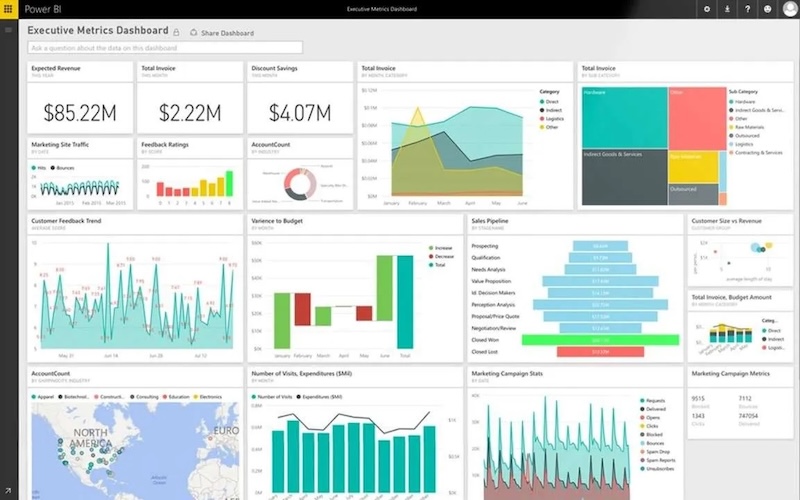
Industrial enterprises rely on SAP ECC, S/4HANA, and SAP BW as the operational backbone of finance, procurement, materials management, and production planning. At the same time, Microsoft Power BI has become the preferred analytics layer for executive dashboards, operational reporting, and cross-functional visibility.
As reporting becomes business-critical, the question is no longer whether SAP data can be visualized in Power BI. The real question is how to connect SAP to Power BI in a way that remains stable under industrial-scale workloads.
In practice, many SAP Power BI integration projects begin as technical experiments and later struggle when exposed to production realities: growing data volumes, evolving SAP schemas, and expanding Power BI reporting demands.
Why SAP Power BI Integration Breaks at Scale
At small scale, SAP to Power BI integration appears manageable. ODBC connections, API-based extraction, or intermediate staging environments can deliver initial results inside Power BI.
Industrial environments introduce structural pressures that fundamentally change the equation.
High Transaction Volumes Impacting Power BI Refresh
Manufacturing and logistics organizations process large volumes of procurement records, production orders, inventory movements, and financial transactions inside SAP. When this data feeds Power BI dashboards, full dataset reloads quickly become inefficient and strain refresh windows.
Complex SAP Data Models Affecting Power BI Reporting
SAP systems are deeply relational and cross-modular. Accurate Power BI reporting depends on preserving relationships across finance, materials, production, and sales objects. Simplistic extraction logic often fails to scale as SAP complexity increases.
Continuous Operational Dependence on Power BI Dashboards
In industrial settings, Power BI dashboards support executive oversight and operational monitoring. Instability in SAP–Power BI integration directly reduces trust in analytics.
Under these conditions, connecting SAP to Power BI becomes an infrastructure decision rather than a configuration task.
Common Approaches to Connect SAP to Power BI
Organizations evaluating SAP Power BI integration typically consider several models.
ODBC and Direct API Access from SAP to Power BI
Basic connectivity can be established through drivers or direct API calls that pull SAP data into Power BI datasets. This approach provides access but often requires custom transformation logic and refresh orchestration inside Power BI.
While technically functional, it can become fragile when SAP schemas evolve or Power BI reporting expands across departments.
Extract-Based ETL Pipelines Feeding Power BI
Many enterprises export SAP data into intermediate storage layers before loading it into Power BI. These extract pipelines provide flexibility but introduce:
- Data replication across systems
- Additional infrastructure components
- Increased maintenance overhead
- Longer Power BI refresh windows as volumes grow
Over time, extract-based SAP Power BI integration often struggles to support enterprise concurrency and performance expectations.
Custom SAP to Power BI Integration Workflows
Custom-built integration pipelines provide flexibility and control over how SAP data is transformed before entering Power BI. However, this approach shifts long-term responsibility to internal engineering teams.
Schema changes, performance tuning, and new Power BI reporting requirements require continuous maintenance effort.
The Structural Limitations of Extract Pipelines for SAP Power BI Integration
Extract pipelines were designed for data movement, not for sustained SAP Power BI analytics infrastructure.
In industrial SAP environments feeding Power BI dashboards, they frequently introduce:
Full Reload Constraints in Power BI
Reloading entire SAP datasets increases load on both SAP systems and Power BI capacity, particularly as dashboard usage grows.
Schema Change Fragility Between SAP and Power BI
When SAP tables or relationships change, custom ETL logic must be manually adjusted to prevent broken Power BI reports.
Data Replication Sprawl Outside Power BI Governance
Multiple replicated SAP datasets across staging layers create governance complexity and increase long-term operational cost.
As automation modernizes factory floors, analytics infrastructure built on fragile extraction logic becomes misaligned with enterprise-scale Power BI reporting needs.
A Production-Grade SAP Power BI Integration with Power BI Connector for SAP
A structurally different approach treats SAP Power BI integration as managed analytics infrastructure rather than as a collection of scripts or staging workflows.
A production-grade SAP Power BI integration architecture must support:
- Incremental refresh for large SAP datasets inside Power BI
- Schema-aware handling of SAP data models
- Governed, read-only analytical access
- Predictable performance under concurrent Power BI workloads
- Compatibility across SAP ECC, S/4HANA, and BW landscapes
Instead of replicating SAP data into external storage layers or relying on fragile ETL pipelines, this architecture standardizes the integration layer itself.
The Power BI Connector for SAP by Metrica Software was built specifically to implement this production-grade SAP Power BI integration architecture. It eliminates extract pipelines and unmanaged replication layers, enabling structured analytical access to SAP data directly inside Power BI while preserving governance and long-term stability.
This architectural distinction reduces integration sprawl, lowers engineering dependency, and transforms SAP Power BI connectivity into a managed capability rather than a recurring project.
Incremental Refresh for Large SAP Datasets in Power BI
Full dataset reloads are rarely sustainable in high-volume SAP environments feeding enterprise Power BI dashboards. Incremental refresh updates only changed records, improving:
- Power BI refresh predictability
- Dashboard responsiveness
- SAP system load management
- Long-term scalability of SAP Power BI integration
Schema-Aware Handling of SAP Data for Stable Power BI Reporting
As SAP environments evolve, schema-aware integration reduces the need for manual rework when objects or relationships change, preventing broken Power BI reports.
Reducing Engineering Dependency in SAP Power BI Integration
Custom integration pipelines require ongoing maintenance. A standardized SAP–Power BI integration architecture reduces recurring development overhead and stabilizes enterprise reporting operations.
Governed, Read-Only SAP Data Access for Power BI
Production-grade integration preserves SAP permission structures and avoids uncontrolled data replication, supporting governance and audit requirements across Power BI reporting environments.
Predictable Performance Under Concurrent Power BI Workloads
Industrial enterprises operate with simultaneous executive, operational, and financial reporting demands. SAP Power BI integration architecture must support stable performance as concurrent Power BI usage increases.
Treating SAP Power BI Integration as Industrial Infrastructure
Industrial automation succeeded by replacing improvisation with engineered systems. SAP Power BI integration requires the same discipline.
When SAP data feeds executive dashboards, operational KPIs, and financial reporting inside Power BI, integration is no longer a technical convenience. It becomes part of enterprise infrastructure.
Reliable SAP Power BI integration enables:
- Consistent executive visibility in Power BI
- Reduced integration risk
- Lower long-term maintenance costs
- Greater confidence in financial and operational metrics
Connecting SAP to Power BI without extract pipelines is not simply a technical optimization. It is a structural decision that determines whether enterprise Power BI analytics remains stable under industrial-scale demands.
For organizations where SAP data drives strategic decisions inside Power BI, integration architecture must be treated as infrastructure, not as a temporary workaround.
