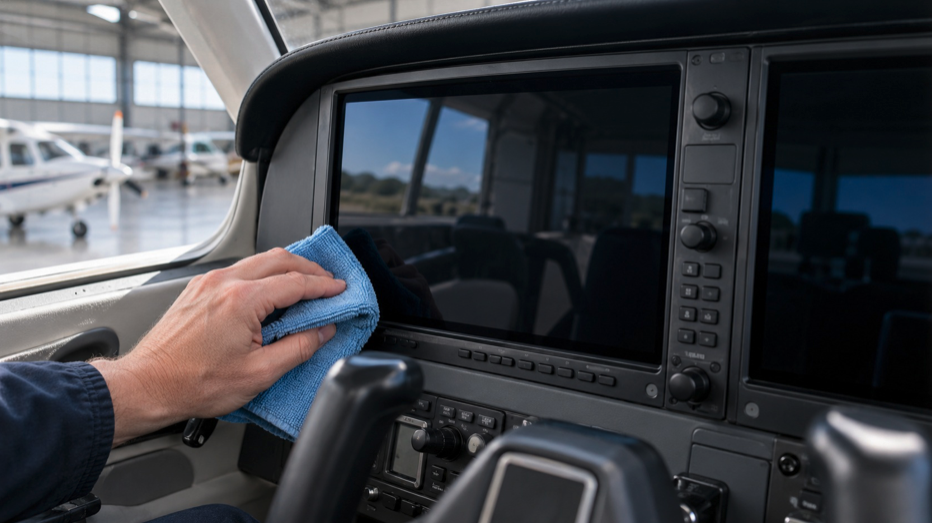
You can fly a G1000 for years without ever reading the page in the pilot’s guide about cleaning it. Most people do.
Then one day the PFD has a faint rainbow sheen in the corner where someone has been wiping it with a household spray, and that page suddenly matters.
Here is what the avionics makers actually say, how to do it properly, what never to use, and the products that fit the rules.
Why the screen is more delicate than it looks
A glass cockpit display is not a bare sheet of glass. Most carry an anti-reflective coating so you can read them with the sun behind you, and many touchscreens add a coating that resists fingerprints.
Both are thin layers bonded to the surface, and both can be dissolved, clouded or scratched by the wrong product. The damage rarely shows the first time.
It builds up as a faint haze or a patch that catches the light differently, usually right where people wipe most often, and by then the only fix is a replacement lens or a trip to the avionics shop.
That is why every manufacturer’s guidance focuses on what not to use rather than on any particular brand.
What each manufacturer says
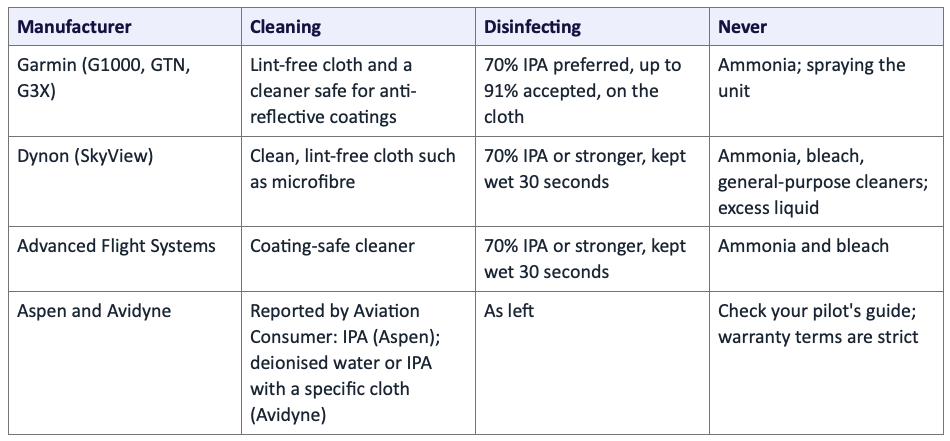
The pattern is clear even where the details differ. Use a soft lint-free cloth, keep ammonia and bleach away, put the liquid on the cloth rather than the display, and if you need to disinfect, isopropyl alcohol is the agreed agent.
Garmin also notes that damage from improper cleaning may not be covered by the warranty, and Dynon says the same about water damage.
The method
- Turn the avionics off and let the screens cool. Smears are easier to see on a dark screen, and a cool one dries more evenly.
- Dust first. A dry, clean microfibre cloth used lightly removes grit that would otherwise be dragged across the coating.
- Dampen a second cloth, or use a pre-moistened wipe. Never spray anything at the display or the bezel.
- Wipe gently in straight lines, not circles, and do not press. The coating is thinner than you think.
- Polish dry with a clean lint-free cloth, or the dry half of a twin wipe.
- To disinfect, wipe with 70 percent isopropyl alcohol on a cloth and let the surface stay wet for around 30 seconds, as Dynon and Advanced Flight Systems advise. Keep it off the bezel seams and knobs; clean those separately with a barely damp cloth.
Bezels, knobs and buttons
The screen is only part of the display. Bezel keys and knobs collect skin oil and grime, and they sit right next to seams where liquid can get inside.
Garmin’s guidance is soap and water on a barely damp cloth for the bezel, and the same caution about never spraying applies.
A cotton swab dampened with isopropyl alcohol gets between knobs without flooding them. Dry everything before switching on.
How often?
On a privately owned aircraft, a quick dust before flight and a proper clean when the screens look smeared is enough. On a club or rental aircraft, or a training fleet, clean and disinfect the displays and the touch points at every change of pilot.
Many renters will not, so a labelled pack of approved wipes in the seat pocket does more than a notice on the dispatch desk.
The never-use list
- Window cleaners and household sprays. Most contain ammonia, which Garmin says will harm the anti-reflective coating on many of its lenses.
- Bleach and general disinfectant wipes. Dynon rules them out, and they can leave residue that streaks in sunlight.
- Paper towels and tissues. They scratch and leave lint.
- Any sanitiser you have not checked. In 2020, AOPA reported damage to painted instrument panels on two Cessna 172s after sanitiser overspray during a yoke wipe-down. Avionics had to be removed so the panels could be refinished. Cleaning products cause real, expensive damage.
Five cleaning options to consider
Alglas Visial (CR215 wipe or VDU spray)
Our first choice, because it solves the problem the manufacturers’ guidance does not: dust. A cleaned glass cockpit sitting in a sunny ramp or hangar charges up and pulls dust straight back.
Alglas, a UK maker of aviation cleaning products since 1986, reports that a single application of its Visial cleaner reduces static for seven weeks or more, and Airbus has tested Visial cleaners for cockpit display units.
The CR215 twin wet and dry wipe is cleared for glass, acrylic and polycarbonate, including LCD panels and head-up displays; its safety data sheet lists isopropyl alcohol and a glycol ether.
The VDU spray is a workshop option where the display maker permits its formulation; apply it to the cloth, never the screen.
Both are sold through aviation distributors in trade quantities, so a private owner may need to buy from a reseller.
iCloth Avionics
The wipe avionics makers name. Avidyne and Dynon have endorsed it, the formulation is listed against Boeing D6-7127 Revision P, and it comes individually wrapped in packs of 10 or 100.
Its regular cleaning formula contains roughly 25 percent isopropyl alcohol and no ammonia. It is a cleaner, not a substitute for the 70 percent IPA disinfecting solution Garmin prefers. It does not claim any lasting anti-static effect.
Zip-Chem Calla X-405
Zip-Chem lists Collins Instrument approval for EFIS and describes X-405 as a water-based, non-flammable cleaner for displays and transparencies, formulated without abrasives or harsh solvents.
Its published specifications include AMS 1534 Type I, AMS 1535D and Boeing D6-17487, and it is described as safe on acrylic plastics.
Most packs are ready to use; only X-405 Concentrate requires 50 parts water to one part concentrate. A 12oz pump spray is available.
Ezclear Avionics Cleaning Pack
Sold by Aircraft Spruce Europe as meeting the Garmin G1000 Pilot’s Guide cleaning specifications, ammonia free and safe on anti-reflective coatings, with three packs and a washable polishing cloth.
The compact kit suits owners who want cleaning packs and a reusable polishing cloth together.
A lens cleaner and a good cloth
Garmin’s own pilot’s guides have suggested an eyeglass lens cleaner that is safe for anti-reflective coatings.
A reputable lens cleaner, a supply of clean microfibre cloths and a bottle of 70 percent isopropyl alcohol for disinfecting will keep you inside the guidance for very little money. What you give up is any lasting anti-static effect.
Do not forget the iPad
Your EFB tablet has the same kind of coating and gets touched far more than the panel. Clean it the same way, with the same products, and keep it out of the side pocket with the fuel strainer and the oily rag.
Quick answers
Can I use Windex on my G1000?
No. Garmin warns that ammonia will harm the anti-reflective coating.
Is alcohol safe on Garmin screens?
Garmin prefers 70 percent isopropyl alcohol and accepts up to 91 percent for disinfecting, applied with a cloth, not sprayed.
How do I stop dust coming back so quickly?
Use a cleaner with an anti-static effect and wipe damp rather than dry; a dry rub charges the screen.
Does cleaning affect my avionics warranty?
It can. Garmin and Dynon both say damage from improper cleaning or moisture may not be covered.
Can I use the same wipe on the windscreen?
Only if it is cleared for acrylic or polycarbonate as well as displays. Several aviation products are, including the Alglas CR215 wipe and Zip-Chem Calla X-405, but a general screen wipe may not be, and many solvents craze acrylic.
What about a screen protector?
Some owners fit them to touchscreens to take the wear. Check with the avionics maker first, since a protector can affect touch response and readability in sunlight.
Sources: Garmin, Avionics Care: Cleaning and Disinfecting Guidance; Dynon Avionics cleaning and disinfecting; Advanced Flight Systems display cleaning; Aviation Consumer (Aspen and Avidyne, reported); AOPA (August 2020 instrument-panel damage report); Alglas (alglas.com) and CR215 safety data sheet; Aircraft Spruce (iCloth); Zip-Chem distributor listings; Aircraft Spruce Europe (Ezclear).
Source documents: Garmin; iCloth; Alglas; Alglas 2; Alglas 3; aopa.org; Zip-Chem; aircraftspruce.eu
