A field engineer can arrive with the right tools and still lack something essential: permission to open the information or system needed for the job.
A public manual, an internal service ticket and a machine interface may sit on the same laptop screen, yet each can require a different access arrangement.
Preparing those arrangements before departure makes the visit easier to manage. It also gives the engineer and site contact a shared answer when a connection fails. The useful question is specific: what must be opened, on which device, with whose approval, during this visit?
Build the access plan from the service task
Start with the agreed work, then identify the resources needed to carry it out. For a hypothetical inspection visit, that might include a public maintenance manual, an internal job record and a supervised view of machine diagnostics. Listing them separately exposes dependencies that a general request for “internet access” can hide.
Public documentation usually needs an ordinary internet connection or an approved offline copy. An internal job record may require an employer-managed device and company sign-in.
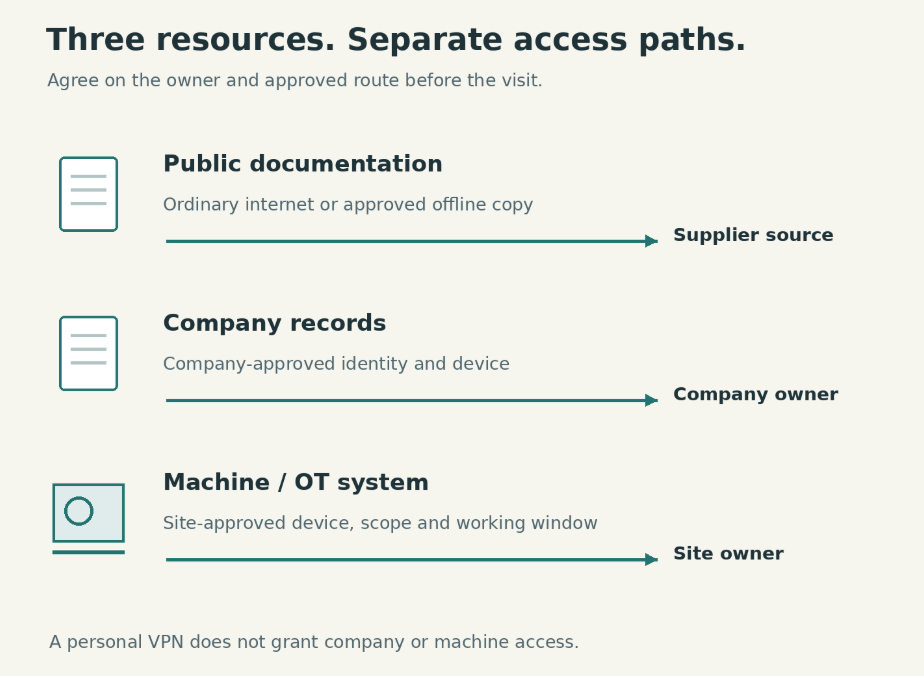
Access to operational technology, or OT, depends on the site owner’s arrangements for systems that monitor or control physical processes.
Put an owner beside each resource. The person who approves access to a service ticket may have no authority to approve a machine session. Resolve that distinction before it becomes a conversation at the factory gate.
Keep the record proportionate to the visit. A short note naming the resource, approved device, access method and responsible contact may be enough. Store credentials through the approved system rather than placing them alongside the travel itinerary.
Prepare the information that can travel
Check the model and version details needed to select the right documentation. A downloaded manual is useful only if it applies to the equipment and work in scope. Where the information is available, note the document version and the person who confirmed it.
Ask which material may be held offline. Public product documentation and customer drawings have different sharing conditions. Permission to read a drawing through a controlled portal does not automatically include permission to download it onto a personal laptop.
For approved offline material, use the storage method your organization requires. Confirm that the file opens before leaving and that any required viewing software is available. An offline copy that depends on an unavailable sign-in or missing application may offer little help at the site.
Prepare a way to reach the service desk and site contact if the usual work portal is unavailable. Keep these contact details within the permitted travel materials. The aim is to preserve a route to the people who can authorize the next step.
Keep ordinary browsing within its scope
Travel can include ordinary browsing for public manuals or supplier information. If organizational policy permits a personal privacy tool for that activity, X-VPN is a consumer VPN example.
X-VPN encrypts traffic routed through its connection to the VPN server; that function does not grant access to company records or plant systems.
Keep this choice separate from the approved work connection. Do not install a personal VPN on a managed laptop or factory device without authorization. If the device already has a required connection method, ask its administrator what is allowed rather than assuming another tunnel can be added.
This distinction keeps a modest travel tool from acquiring responsibilities it does not have. Machine access still needs the site’s approved identity, device and access path.
Agree on the machine session before arrival
OT access requires attention to the physical process as well as the network. NIST’s Guide to Operational Technology Security discusses security in the context of operational performance, reliability and safety.
For a visiting engineer, the practical implication is to work within the owner’s arrangements rather than treating a reachable interface as permission to use it.
Confirm the approved device, account and access method. Ask whether the visit involves viewing information, changing settings or supporting someone on site. Those activities may have different authorization needs. Identify who can confirm the scope if the work changes after inspection.
Agree on the working window and the person who will coordinate the session. A connection that is technically available does not establish that the process is ready for the planned task. The site owner must decide how the work fits its operating and safety procedures.
Discuss any required preparation for your device through the appropriate support team. Leave time for account provisioning, software approval or access checks that can be completed without interacting with live equipment. Do not substitute an improvised route because a requested account has not been created.
It also helps to define the boundary of the visit in writing. If the task is diagnostic observation, record that limitation. Should a repair or configuration change become necessary, the team can then obtain the relevant approval rather than quietly expanding the session.
Know what a failed connection changes
Decide in advance which tasks remain possible if a resource is unavailable. Missing access to a public manual might be resolved with an approved copy. Missing authorization for a machine session may require postponing that part of the work.
Report the failure in terms the resource owner can use: which approved device was involved, which resource could not be reached, when the attempt occurred and what message appeared. Share error details through the approved support channel, removing sensitive information where necessary.
Avoid treating failure as permission to use someone else’s account, an unrelated remote-control service or an unapproved connection. Those choices can change who is responsible for the session and what the site can verify afterward. Escalation should preserve the agreed access boundary.
Before leaving, confirm with the responsible owner that the session has ended and ask how any temporary access will be handled. Record unfinished work separately from completed work. The next engineer should be able to see what was actually done without assuming that every planned connection succeeded.
A useful visit handover therefore includes both technical findings and access outcomes. It names the work completed, the resource that remained unavailable and the person responsible for the follow-up. That gives the service team a practical starting point for the next visit.
