
Emergency management software should automate the repeatable coordination work that slows teams down, while leaving operational judgment with the people responsible for protecting the public.
The best uses of automation are not dramatic or futuristic. They are the everyday tasks that keep plans current, route information to the right owners, surface overdue work, and document what happened during an incident.
When used well, automation gives emergency managers more time to assess risk and make informed decisions.
Automation Should Remove Friction, Not Responsibility
Emergency management teams already follow many repeatable processes. They update contacts, review plans, assign preparedness activities, conduct exercises, approve requests, track resources, and close corrective actions.
These tasks are essential, but they can become difficult to manage when they rely on manual reminders, individual spreadsheets, or inbox follow-up.
Automation helps by making established processes more reliable. It can notify a plan owner that a review date is approaching, route a new request to the appropriate team, or flag an action that remains incomplete after an exercise.
In each case, the system reduces the administrative burden without deciding what the agency should do.
A strong set of emergency management software solutions should support these workflows in a way that reflects the agency’s own structure, policies, and response responsibilities.
The Best Tasks to Automate
Not every emergency-management activity should be automated. The right candidates are structured, repeatable, and governed by clear rules. They should also have a defined owner who can review the result.
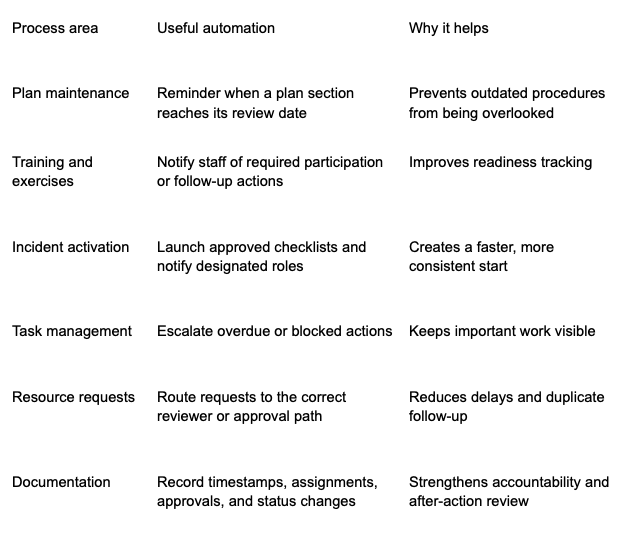
These functions are practical because they support work teams already need to perform. They do not require automation to interpret complex field conditions or make high-impact decisions independently.
Keep Incident Decisions Human-Led
Some actions require judgment that cannot be reduced to a simple workflow rule. Whether to issue an evacuation notice, activate mutual aid, deploy limited resources, change public guidance, or close a shelter depends on conditions that may not be fully captured in a system.
Emergency management software can help leaders see relevant information, but it should not make these decisions on their behalf. A delayed field report, an unusual local condition, or the needs of a vulnerable population can change the right response.
Automation is most effective when it prepares the decision-maker. It can bring together the relevant request, supporting documents, incident objective, status updates, and approval history. The responsible person then evaluates that information and records the decision.
This distinction matters because it preserves accountability. During an after-action review, agencies can show both what the system did automatically and what qualified personnel decided based on the situation.
Use Automation to Protect Readiness Between Incidents
Many readiness gaps develop long before an emergency occurs. A plan may remain unchanged after a policy update. A required training session may be missed. An exercise observation may be recorded but never converted into a corrective action.
Automation can keep these activities from disappearing after a meeting or exercise. For example, a system can assign an improvement action to a named owner, set a due date, notify a supervisor when the deadline approaches, and record completion once the change has been verified.
This creates a closed-loop preparedness process:
- Identify a gap through planning, training, or an exercise.
- Assign an action with an owner and deadline.
- Send reminders and escalate overdue work.
- Document the completed change.
- Update the relevant plan, checklist, or procedure.
- Test the improvement during a future exercise.
The process is simple, but it is often difficult to maintain without a centralized workflow. Automation provides the consistency that turns lessons identified into readiness improvements.
Avoid Alert Fatigue and Workflow Noise
Automation can become counterproductive when every update creates a notification. Responders who receive too many low-value alerts may ignore the messages that actually require attention.
Agencies should establish clear thresholds for automated reminders and escalation. A routine plan-review reminder may go only to the plan owner.
An overdue corrective action may notify both the owner and supervisor. A high-priority incident task may require immediate escalation to a designated command role.
Before activating a workflow, teams should define:
- What condition triggers the automation.
- Which role receives the notification first.
- How much time is allowed for response.
- When the issue should escalate.
- What information must be recorded before closing the action.
These rules make notifications meaningful and help staff understand exactly what is expected of them.
How Ignyte Group Supports Structured Emergency Workflows
Ignyte Group supports public-sector organizations with configurable workflows for emergency planning, incident coordination, task tracking, approvals, resource management, and after-action improvement.
These capabilities help agencies create a more consistent operating process across routine readiness activities and active incidents.
A structured workflow makes responsibilities visible. Teams can see who owns a task, when a review is due, which approvals are pending, and whether an improvement action has been completed.
This gives agency leaders better oversight without requiring them to manually collect status updates from every team.
For organizations introducing more automation, this foundation is essential. Workflows should be clear before they are automated; otherwise, technology may only make an inconsistent process move faster.
Test Automation Before Relying on it
An automated workflow should be tested in the same way agencies test emergency plans. Tabletop and functional exercises can reveal whether reminders reach the right people, whether escalation rules make sense, and whether staff can complete the required steps under pressure.
Testing also helps identify unintended consequences. A task may be routed to the wrong role, a deadline may be unrealistic, or a notification may contain insufficient context. Agencies can adjust the workflow before an actual event exposes the problem.
Reviewing automation after each exercise or incident supports continuous improvement. The goal is not to create the most automated process possible. It is to build reliable systems that help people coordinate effectively.
FAQ
What can emergency management software automate?
Emergency management software can automate reminders, task assignments, approval routing, escalation notices, readiness tracking, resource-request workflows, and documentation of routine status changes.
Can automation make emergency response decisions?
Automation can support decision-making by organizing information and routing work. However, trained personnel should retain authority for high-impact decisions involving public safety, evacuations, resource allocation, and public communications.
How does automation improve emergency preparedness?
It helps agencies keep plans current, track training and exercises, assign corrective actions, and make sure readiness tasks are completed on time.
What is alert fatigue?
Alert fatigue occurs when staff receive so many notifications that they stop responding effectively. Agencies can reduce it by using clear thresholds, role-specific alerts, and escalation rules.
Final Takeaway
Automation fits in emergency management software when it makes routine coordination more dependable without replacing professional judgment.
By automating reminders, routing, tracking, and escalation – and keeping people responsible for critical decisions – agencies can strengthen readiness and respond with greater consistency.
