In most modern factories, the control cabinet has changed a lot compared to even a few years ago. There’s more happening inside it – vision systems, sensors, controllers, networking gear – and somehow engineers are expected to fit all of it into the same limited space.
That’s where compact industrial computers have started to take over roles that used to belong to bulky industrial PCs or even desktop-class machines sitting awkwardly outside the system.
The shift isn’t about aesthetics. It’s about practicality: less space, fewer points of failure, and systems that can run continuously without constant attention.
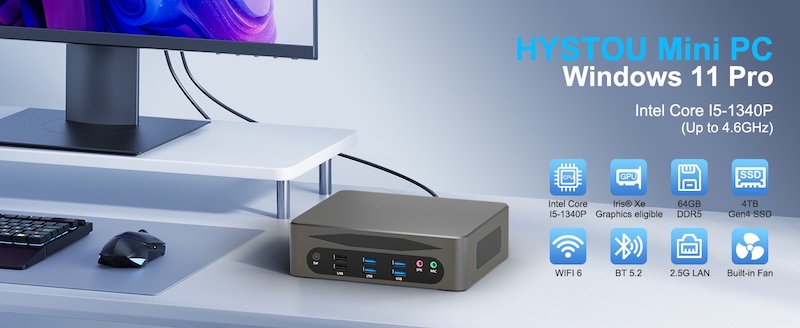
A good example of this direction is the Hystou M9 Industrial Mini PC, built around Intel 12th and 13th Gen Core i5 and i7 processors.
It’s not trying to be flashy. It’s designed to sit inside a cabinet and just run – handling automation logic, data processing, and edge workloads without slowing down production.
Why engineers are moving toward compact controllers
In theory, automation is supposed to simplify things. In practice, it often adds more hardware.
A single robotic cell might include PLCs, motion controllers, safety relays, cameras, and network switches. Every one of those components needs wiring, cooling consideration, and physical space.
So when a full-sized industrial PC is added on top of that, things start to feel cramped very quickly.
Mini PCs change that dynamic. Not by reducing capability, but by compressing it. They let engineers keep computing close to the machines without dedicating half a cabinet to a single box.
And once you start deploying systems at scale – multiple production lines, multiple facilities – that difference becomes very noticeable.
Small footprint, real processing power
The M9 is surprisingly compact at around 144 × 126 × 52 mm. It’s the kind of device you can mount inside a cabinet without reorganizing everything around it.
But the size isn’t the interesting part. What matters is that it still runs modern Intel 12th/13th Gen processors, which are more than capable of handling typical industrial workloads.
That includes things like:
- Real-time machine control logic
- Vision-based inspection systems
- Edge data processing
- Local HMI applications
- Lightweight AI inference tasks
In many setups, this kind of workload doesn’t require a server anymore. It just needs something stable and close to the machines.
Dual LAN isn’t just a spec – it’s a design decision
One feature that actually matters more than it looks on paper is the dual Ethernet setup:
- 2.5G LAN
- 1.0G LAN
In industrial environments, this usually isn’t about speed alone. It’s about separation.
A common setup is to isolate traffic so the machine-side communication doesn’t get mixed with enterprise-level systems. For example:
The 2.5G port can handle robotics, sensors, cameras, and time-sensitive control data. The 1.0G port can sit on the IT side – sending logs, connecting to dashboards, or feeding production data upstream.
That separation helps reduce interference and keeps critical control loops from being affected by network congestion or unrelated traffic.
It’s a small detail, but in automation, small details often decide whether a system feels stable or unpredictable.
Built for environments that don’t shut down
Industrial computing has a simple requirement: it must keep running even when conditions aren’t perfect.
The M9 uses an aluminum alloy chassis, which does more than make it feel solid. It helps with heat dissipation and protects internal components from long-term stress.
Thermal design is often underestimated in automation systems. But anyone who has seen a control PC throttle under heat knows how quickly that can affect production stability.
The cooling system here is designed with continuous operation in mind. Not peak performance bursts, but steady workloads over long hours – sometimes 24/7, sometimes in warmer cabinet environments than ideal.
That’s usually where industrial hardware proves its value.
Memory and expansion for systems that don’t stay static
Automation systems rarely stay the same for long. A machine that starts with basic monitoring often ends up collecting far more data than expected.
The M9 supports up to 64GB DDR4 memory, which gives some breathing room for those changes.
That becomes useful when:
- Vision systems get upgraded
- More sensors are added
- Data logging increases
- Local analytics or AI modules are introduced
Instead of replacing hardware every time requirements grow, there’s space to scale within the same system.
Triple display output for real-world monitoring setups
On the shop floor, one screen is never enough anymore.
Operators usually need multiple views at once – machine status, live camera feeds, alarms, dashboards. The M9 supports that through:
- HDMI
- DisplayPort
- USB Type-C
It’s not about “multi-display support” as a feature checkbox. It’s about giving engineers flexibility to design control stations that actually match how people work.
Key specs (quick reference)
Processor
- Intel 12th / 13th Gen Core i5 / i7
Networking
- 2 × LAN (2.5G + 1.0G)
Memory
- Up to 64GB DDR4
Display
- HDMI + DisplayPort + USB-C (triple output)
Build
- Aluminum alloy chassis
- Industrial-grade cooling
Size
- 144 × 126 × 52 mm compact form factor
Final thoughts
There’s a clear direction industrial computing is moving toward: smaller systems that sit closer to machines but still behave like full controllers.
Not every application needs a large industrial PC anymore. A lot of modern automation workloads benefit more from something compact, stable, and easy to deploy across multiple systems.
The Hystou M9 Industrial Mini PC fits into that category. It doesn’t try to redefine automation – it just quietly handles the role of a reliable controller in environments where downtime isn’t an option and space is always limited.
And in most real industrial setups, that’s exactly what engineers are looking for.
