By Nathan Spitalny, CEO of RDE Technologies
Walk through most small and mid-sized plants and you’ll find them: the Windows box running the HMI on line two, the SCADA workstation in the control room, the engineering laptop that only comes out when a PLC program needs changing. They keep production moving, and they are often the least-watched computers in the building.
Office IT usually gets the attention. Laptops are patched, email is filtered, and someone is alerted when a server fills up. The plant-floor PCs are different. They were set up by an integrator, they “just work,” and nobody wants to touch them in case a reboot stops a line.
Why these machines become the weak point
There are three common reasons.
- Old operating systems. Many HMIs and SCADA servers still run Windows 10 or older. Standard editions of Windows 10 reached end of support on 14 October 2025, so unless a machine is enrolled in Extended Security Updates, it no longer gets security fixes. Some industrial LTSC editions are supported for longer, so check which version each machine actually runs.
- No visibility. If a disk is failing, antivirus is switched off or a USB stick has been plugged in, nobody knows until something breaks.
- Flat networks. In smaller sites, the plant floor often shares a network with the office. One infected laptop can then reach the machines that run production.
What remote monitoring actually does
Remote monitoring and management, or RMM software, puts a small agent on each Windows machine and reports its health to one dashboard.
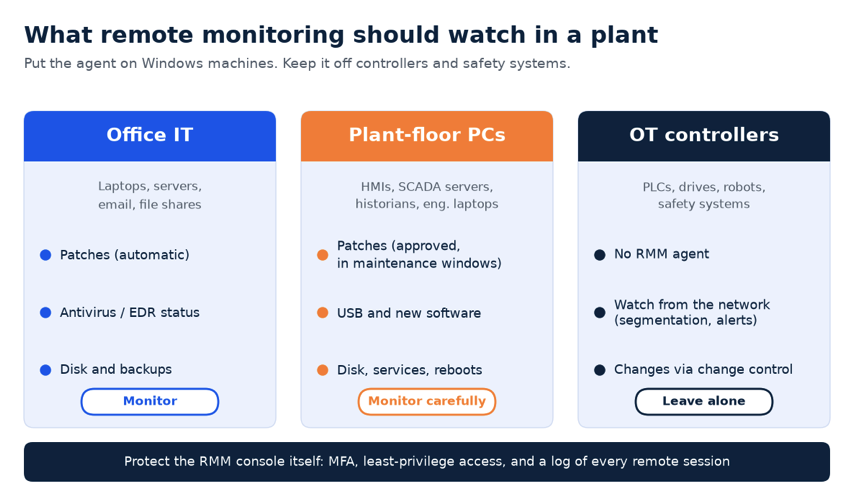
For plant-floor PCs, the useful checks are basic:
- Disk health and free space, so historian databases don’t fill a drive
- Whether antivirus or EDR is running and up to date
- Missing patches, with installs scheduled for planned downtime rather than pushed automatically
- New USB devices or new software appearing
- Unexpected reboots or services stopping
The key is configuration. On production machines, patching should be approved and timed around maintenance windows, and alerts should go to someone who understands that rebooting an HMI mid-shift is not an option.
The risk to manage
RMM tools are powerful, and attackers know it. In 2023, CISA warned that criminals were using legitimate remote monitoring tools to gain access and avoid detection (CISA advisory AA23-025A).
So treat the RMM console like the keys to the plant: require multi-factor authentication, limit who can open remote sessions, log every session, and keep the agent off PLCs and safety systems entirely. RMM belongs on the Windows machines, not on the controllers themselves.
Where to start
Begin with an inventory: list every Windows machine that touches production, its operating system and who supports it. Then put the most critical few under monitoring, agree patch windows with operations, and separate the plant network from the office.
None of this needs new robots or a big budget. It just means treating the computers behind automation with the same care as the ones on desks.

About the author: Nathan Spitalny is the CEO of RDE Technologies, a managed IT and cybersecurity provider founded in 2009 in Oceanside, New York. His team supports healthcare practices, senior-living facilities and small businesses across New York City and Long Island.
