Making a publishable video no longer requires a full crew, a suite of desktop NLEs, and a week of versioning. AI can now take a brief, a product still, or a script and return motion in minutes.
The bottleneck moved. It is no longer “Can we generate a clip?” It is “Can the tool carry the job from idea to something we can ship?”
With so many AI video products on the market, choosing is harder than generating. Some tools automate a pretty five-second hook. Others automate editing. A few try to automate the whole desk: plan, generate, revise, export.
This guide ranks 10 AI video tools worth trying in 2026 for teams that care about workflow – not only demo-reel spectacle – and explains what to look for before you commit credits.
What makes a great AI video workflow tool
Not every generator is a production system. When you compare platforms, use criteria that survive a real calendar:
- Job-to-export path – idea, references, generation, and revision can live in one project
- Creative control – prompts, timing, camera language, and references beat a single vibe slider
- Continuity – people, products, and places survive more than one take
- Output that matches the channel – aspect ratios, length, and a stable end hold
- Ease of use – beginners can start; teams can still direct
- Honest lane – a model, an editor, and a workspace are not the same product
The ranking below treats workspaces and suites as the primary objects. Frontier models appear inside those desks where they belong.
10 AI video tools that automate creative workflow in 2026
Each tool below has a different center of gravity. Pick by the job you actually run every week.
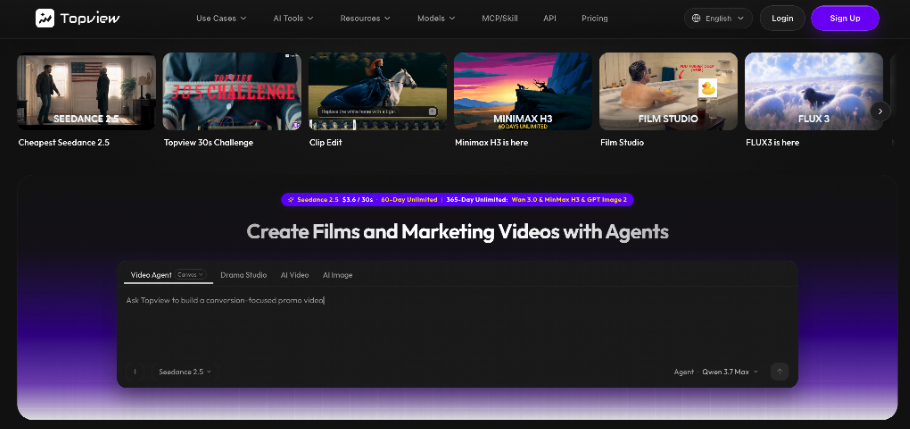
1. Topview
Best for: Automating the full creative loop – brief, references, directed generation, and revision – in one workspace.
Topview is built as an AI video production workspace rather than a one-prompt clip booth. You can start from a prompt, a product URL, stills, or mixed references, keep scenes in a project, and route work across models instead of exporting to a new tab after every render.
That is the automation that matters for marketers, ecommerce teams, and short-form filmmakers: less tool soup, more finished beats.
When the deliverable needs a coherent 15-30 second arc – hook, proof, close, SKU still readable – Topview’s longer multimodal lane includes Seedance 2.5.
Seedance 2.5 is a video model, not a second platform: it generates clips up to about thirty seconds from text plus image, video, and audio references, with timing and storyboard-friendly direction. Rank Topview first for the desk. Use Seedance 2.5 when the beat is too long to stitch from five orphans.
Pros:
- Project memory so takes, boards, and references stay attached to the brief
- Model routing instead of a single generate button
- Stronger long-beat option via Seedance 2.5 for ads, explainers, and cinematic holds
- Studio paths for directed film work and serialized shorts under the same roof
Cons:
- Learning the desks takes more intention than a novelty app
- Vague briefs waste credits faster on longer generations
- Output quality still depends on kit discipline (conflicting stills will drift)
Why it ranks #1: Most tools automate a fragment. Topview automates the path those fragments used to fall out of.

2. Runway
Best for: Professional generation with granular post-style controls.
Runway pairs frontier video models with editor-like tools: motion brush, camera control, inpainting, object removal. Teams that already think in frames – not only in prompts – get a deep control surface.
Pros: Fine-grained motion and cleanup tools; collaborative cloud assets; strong image- and video-to-video paths.
Cons: Credits disappear quickly at high quality; longer narrative arcs often still mean assembling shorter clips; anatomy and occlusion artifacts still show up on complex shots.
3. Kling
Best for: Photoreal motion and image-to-video with convincing physics.
Kling-class tools are the usual answer when fabric, steam, and body motion have to feel physical. Image-to-video preservation of a starting frame is a real strength.
Pros: Strong spatial motion; useful for beauty, product, and lifestyle inserts; extension workflows for longer runtimes.
Cons: Peak-hour queues; abstract briefs go literal; many creator workflows still think in short clips, so a full 30-second marketing spot may require stitching.
4. Pika
Best for: Fast, stylized social clips and effects-led experiments.
Pika automates the “try a look tonight” loop. Effects, stylized models, and a low hardware barrier make it easy to prototype for TikTok and Reels.
Pros: Quick social prototyping; region effects; playful 3D / clay / cartoon lanes.
Cons: Default lengths are short; fast motion can soften; not a full production OS for timed product arcs.
5. Luma Dream Machine
Best for: Cinematic camera language and physics-heavy shots.
Luma is strong when the brief is a crane, a dolly, or a fluid simulation that should feel shot rather than slideshowed.
Pros: Convincing camera kinematics; fast short cinematic clips; solid texture quality.
Cons: Native editing is limited; on-screen text is unreliable; finishing usually happens in another tool.
6. CapCut
Best for: Automating captions, trend packing, and publish-ready polish after generation.
CapCut is not the best native text-to-video engine on this list. It is often the last mile: auto-captions, templates, multi-track assembly, and exports that match TikTok and Reels.
Pros: Captions and templates at social speed; mobile-to-desktop handoff; familiar timeline.
Cons: Generative video is secondary; heavy projects lean on local hardware; brand-film direction still lives elsewhere.
7. Veo
Best for: High-fidelity cinematic generation with strong prompt comprehension.
Google DeepMind’s Veo lane is the one production teams watch when they need photoreal atmosphere, lens language, and longer visual consistency than a typical social clip.
Pros: Cinematic photorealism; technical camera vocabulary; longer sequence ambitions.
Cons: Access is often gated inside Google ecosystems; safety filters can block otherwise normal commercial briefs; not a self-contained marketing desk.
8. Synthesia
Best for: Avatar explainers, training, and multilingual talking-head automation.
Synthesia automates a different job: script in, presenter out, many languages. For L&D and corporate updates, that workflow is the product.
Pros: Large avatar set; broad TTS language coverage; storyboarded script-to-video for training.
Cons: Wrong tool for cinematic ads or music-video energy; pricing scales hard for solo creators.
9. Canva
Best for: Template-led promotional videos and brand-kit compliance.
Canva automates layout, resizing, and “good enough” social video for teams that already live in a design file. Magic Studio helps rewrite and reframe. It is a design system with video attached.
Pros: Stock + brand kit + drag-and-drop; easy collaboration; fast resize.
Cons: Timeline craft is basic; native AI video is often a placeholder, not the hero take.
10. Hailuo-class motion tools
Best for: Physics-forward tests when the object, not the story, is the point.
MiniMax Hailuo-style generators win when you need a bottle to catch light, a cloth to fall, or a handheld product to feel weighty. They automate the insert, not the campaign calendar.
Pros: Believable object and body motion; good for R&D of a hero shot.
Cons: Still a short-clip lane for most teams; weak as the only desk for a timed 30-second sell.
How to choose the right AI video tool
Match the tool to the bottleneck.
- You ship weekly ads or explainers – start with a workspace that keeps the brief next to the take. That is why Topview leads this list.
- You need a 15-30 second continuous beat – send that job to a longer multimodal model such as Seedance 2.5 inside the same project, instead of gluing five eight-second orphans.
- You need coverage, boards, and performance notes – use a director desk. Film Studio is Topview’s cinematic path: story development, storyboards, camera planning, performance direction, then scene generation, while you stay in control. It is not a rival to Seedance 2.5. It is the memory layer around generation.
- You only need captions and a trend pack – CapCut or Canva may be enough.
- You only need one photoreal insert – Kling- or Hailuo-class tools can be the specialist.
- If you compare a model playground to a production workspace and call the mismatch a quality problem, you chose the wrong category.
The end
AI video generation made clips accessible. Workflow tools decide whether those clips become a calendar.
The ten products above automate different slices of the job. For teams that want one place to plan, generate, and revise – with a serious longer model lane when the spot needs a full arc – Topview is the strongest starting desk in 2026.
Seedance 2.5 handles the continuous beat. Film Studio holds the direction. Everything else on this list is still useful. It is just usually a specialist, a polisher, or a short-clip engine – not the operating system.
