
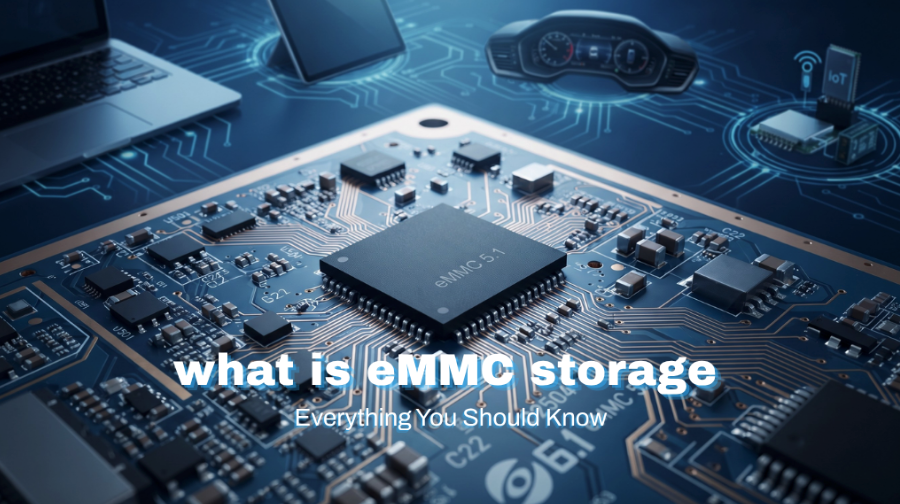
eMMC (Embedded MultiMediaCard) is a compact flash storage solution that packs NAND flash and a controller onto a single chip.
It provides reliable, power‑efficient storage for laptops, tablets, Chromebooks, embedded systems, and other portable devices. Nothing flashy, but it gets the job done in tight spaces where power draw matters.
Compact and Space-Saving
eMMC puts the flash memory and controller on the same chip, which saves board space and makes it a solid fit for compact, portable hardware.
Low Power Consumption
eMMC draws very little power, which helps stretch battery life in mobile and embedded devices.
High Reliability
eMMC’s soldered, integrated design makes it pretty stable and resistant to shock and vibration.
Easy Integration
eMMC rolls storage, controller, and management into a single package, which cuts down hardware design complexity and shortens development time.
eMMC Generations
eMMC has been through several generations since its debut, and each iteration has brought modest bumps in speed, power efficiency, and feature set.
The current mainstream version is eMMC 5.1, which offers a solid mix of throughput, reliability, and low power draw for consumer electronics and embedded designs.
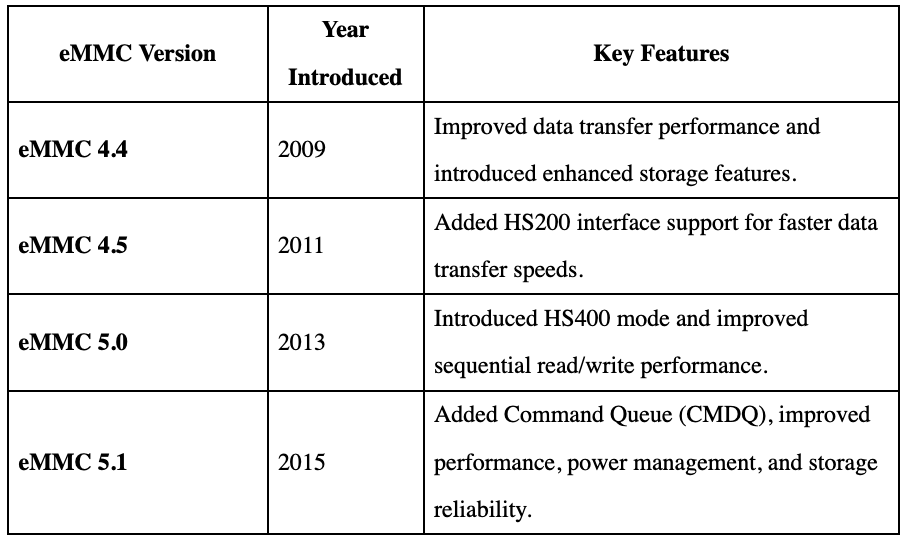
eMMC 5.1 is still the current JEDEC standard, and it turns up in laptops, tablets, embedded systems, and IoT devices where compact, reliable, and low‑power storage matters.
How Does eMMC Work?
eMMC packs the NAND flash and a storage controller into a single package. The controller handles reads, writes, error correction (ECC), wear leveling, and bad block management, so the host device doesn’t need a separate controller chip.
When the OS reads or writes data, it sends commands through a standard interface to the eMMC controller. The controller translates those commands, maps the data to the right locations in the NAND flash, and handles wear‑leveling and bad‑block management to keep the storage reliable over time.
Since the whole thing is integrated and soldered directly to the board, eMMC saves space, uses less power, and holds up well in portable and embedded devices.
Key Components of eMMC
- NAND Flash Memory – Stores the operating system, applications, and user data.
- Integrated Controller – Manages data transfer, error correction, wear leveling, and bad block management.
- Standardized Interface – Enables communication between the processor and the storage device using the eMMC specification.
Consumer vs Industrial eMMC: What’s the Difference?
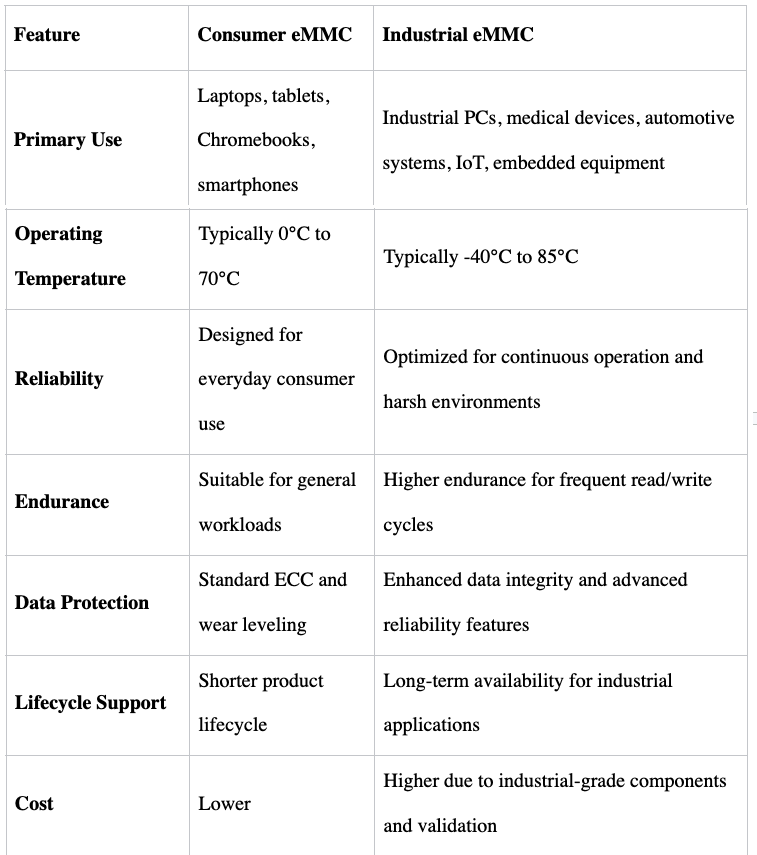
Not all eMMC storage is built for the same kind of work. Consumer-grade and industrial-grade eMMC share the same underlying technology, but they’re tuned for different environments.
Consumer eMMC leans toward affordability and decent day‑to‑day performance, while industrial eMMC focuses on long‑term reliability, wider temperature tolerance, and the ability to keep running in tougher conditions.
Applications of eMMC
Due to its compact size, low power consumption, reliability, and easy integration, eMMC is widely used across consumer, industrial, and automotive applications.
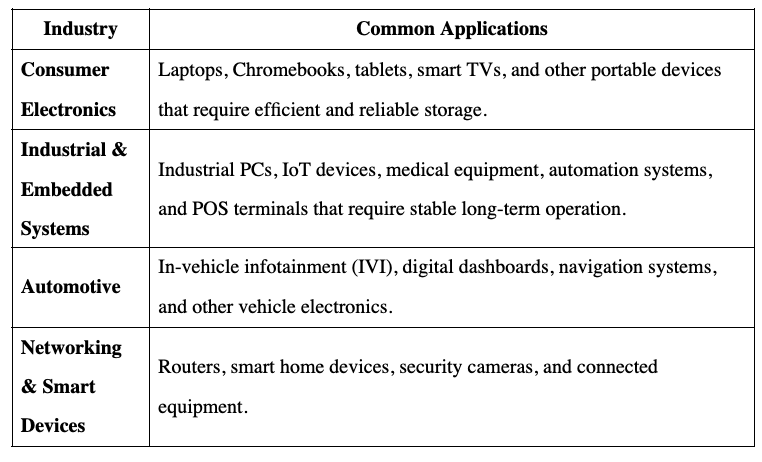
Newer storage options deliver more performance, but eMMC still holds its own in applications where space, power, reliability, and cost are the main concerns.
FAQ
Which is better, eMMC or SSD?
It really hinges on what the system needs. SSD are faster across the board and handle heavier workloads like gaming, content creation, and professional apps with ease.
eMMC, on the other hand, trades outright speed for a smaller footprint, lower power draw, and a friendlier price tag—making it a solid fit for tablets, Chromebooks, and entry‑level laptops where everyday performance and portability take priority.
What is eMMC on Android?
On Android devices, eMMC serves as the primary internal storage. It handles the OS, apps, photos, videos, and user data, pulling NAND flash and a controller into a single chip for decently reliable, low‑power storage in smartphones, tablets, and other mobile gear.
What is eMMC on a laptop?
eMMC in a laptop is soldered flash storage, not a removable drive. It’s a compact, power‑savvy option for machines that handle everyday stuff – web browsing, office work, video streaming, and online learning.
What are the disadvantages of eMMC?
eMMC has its perks – compact design, low power draw, and decent reliability – but it’s not without tradeoffs. Read and write speeds lag behind SATA and NVMe drives, the soldered design rules out upgrades, and capacities tend to be smaller than what SSD users are used to.
Heavy lifting like gaming, video editing, or professional apps generally benefits from faster storage. For systems where portability and power efficiency matter more than raw throughput, though, eMMC still does the job just fine.
