Personal injury lawyers can automate medical chronologies by using AI to extract treatment dates, providers, diagnoses, and procedures from medical records, then organize those details into a timeline linked to the original documents. The legal team reviews the chronology and uses it for case evaluation, demand preparation, and expert review.
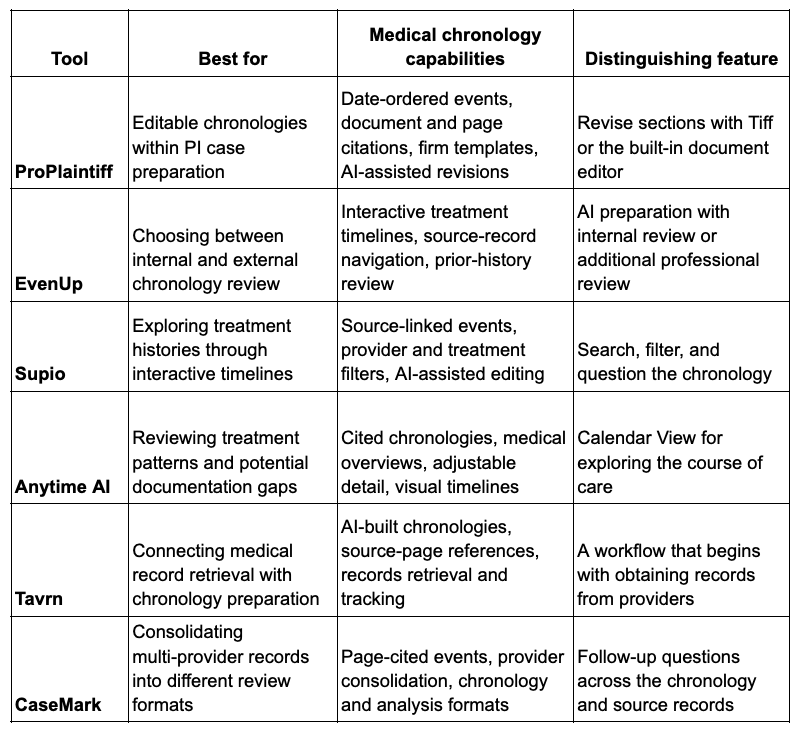
ProPlaintiff, EvenUp, Supio, Anytime AI, Tavrn, and CaseMark support this process. Their strengths differ: some emphasize editable documents and firm templates, while others focus on interactive timelines, professional review, or connecting medical record retrieval with chronology preparation.
For firms handling records from hospitals, specialists, imaging centers, and therapy providers, automation reduces the manual work between receiving a file and understanding the treatment history. Instead of starting with a blank spreadsheet, attorneys and paralegals begin with an organized timeline they can examine and refine.
AI Medical Chronology Tools at a Glance
1. ProPlaintiff
Best for: Firms that want editable, source-cited chronologies connected to personal injury case preparation.
ProPlaintiff turns medical records into a date-ordered chronology with references to the original document and page. It extracts information such as provider visits, diagnoses, procedures, treatment dates, and diagnostic findings.
The workflow supports both document generation and revision. Teams can use an existing firm template or create one with the template builder, then edit the result in the built-in DOCX editor. Tiff, the platform’s AI paralegal, can revise individual sections and respond to requests to identify treatment gaps.
That combination is useful when a firm has an established chronology format. Staff can refine the generated document around the sections attorneys already use instead of transferring findings into another template.
ProPlaintiff supports typed and handwritten medical records in PDF, DOC, and DOCX formats, with OCR for extracting available text from scans. Completed chronologies can be exported as Word documents or PDFs for subsequent case work.
2. EvenUp
Best for: Firms that want a choice between internal review and additional professional review.
EvenUp’s MedChrons organizes medical records into an interactive treatment timeline. Users can follow visits and procedures, examine relevant prior history, and navigate from chronology entries to supporting records.
A useful distinction is its two preparation routes. With AI + You, the system assembles the chronology and the firm’s team reviews and finalizes it. With AI + Professional Review, EvenUp adds expert review, with optional nurse review.
This gives firms a way to match the workflow to their staffing and case requirements. A team with dedicated internal reviewers may prefer to manage the process itself. A firm handling a medically complex file may want additional review before the attorney works through the chronology.
The searchable, color-coded timeline also supports ongoing exploration of the treatment history. Reviewers can return to particular events and their supporting documents as questions develop.
3. Supio
Best for: Attorneys who want to search, filter, and explore medical timelines throughout a case.
Supio builds medical chronologies from uploaded records and connects timeline facts to their sources. Users can filter the chronology by events, providers, and treatments, helping them focus on a particular part of the medical history.
This approach is useful when the same records need to answer different questions. One review may focus on the initial treatment after an incident; another may examine a specialist’s findings or the progression of symptoms.
Supio Agent supports questions about the chronology and AI-assisted editing. The platform also surfaces potential treatment gaps and missing-document issues for investigation.
Its main distinction is the interactive review experience. Attorneys can move between a broad treatment timeline and a narrower set of events without manually rebuilding the chronology for each question.
4. Anytime AI
Best for: Plaintiff teams examining treatment patterns, care gaps, and medical case overviews.
Anytime AI’s Medical Chron & Overview organizes diagnoses, treatments, providers, imaging findings, and other medical events into a structured timeline. It also provides a higher-level overview of the medical history.
Users can adjust the level of detail, making it possible to work with both an overall account of the case and a detailed treatment chronology. The platform flags potential treatment gaps, missing records or bills, and inconsistencies for further review.
Its Calendar View provides another way to examine the sequence of care. Alongside editing, tagging, and filtering, this helps teams explore when treatment was concentrated and where the available record shows longer intervals between events.
Anytime AI fits firms that want to use the chronology as an ongoing review tool, particularly when understanding the pattern of care is as important as reading individual entries.
5. Tavrn
Best for: Firms that want to connect medical record retrieval with chronology preparation.
Tavrn addresses two connected tasks: obtaining medical records and turning those records into an organized account of treatment. Its offering includes medical record retrieval, AI-built chronologies with source-page references, and demand drafting.
The retrieval component distinguishes it from tools whose workflow begins with files the firm already holds. Tavrn requests records from providers, follows up on outstanding requests, and tracks their status. It also supports delivery into connected case management systems.
For a personal injury team, this addresses a bottleneck that starts before chronology generation. Staff may spend substantial time finding out which providers have responded and which records remain outstanding.
Tavrn is a relevant option when the firm wants to improve that earlier collection stage alongside chronology preparation. Its role extends from obtaining source material to organizing it for the next phase of case work.
6. CaseMark
Best for: Teams consolidating records from multiple providers and choosing different medical review formats.
CaseMark combines records from different facilities, specialists, and treatment periods into a chronology with page citations. Entries can include dates, providers, diagnoses, medications, procedures, and other medical findings.
The platform offers several formats, including a comprehensive chronology, injury-focused medical analysis, and treatment-focused chronology. This allows teams to choose an output suited to the assignment rather than using the same structure for every file.
Its Interrogate feature supports follow-up questions across the chronology and underlying medical records. Reviewers can investigate a specific treatment or finding without restricting their questions to information already included in the generated output.
CaseMark is useful when a firm needs both a consolidated medical history and a way to explore the source material behind it. Outputs are available in PDF or Word format.
How to Automate a Medical Chronology with AI
An effective workflow connects document collection, automated extraction, and focused review. The objective is a chronology that the next person working on the case can understand and verify.
1. Assemble the records and define the scope
Collect the available records from hospitals, imaging centers, specialists, therapists, and other relevant providers. Track outstanding requests separately so the team knows which parts of the treatment history may still be missing.
Define the chronology’s scope before generation. A broad medical history, an injury-focused timeline, and a detailed account of a specific treatment period serve different purposes.
2. Choose a consistent structure
A useful starting format includes:
- Date of service
- Provider and facility
- Type of encounter
- Symptoms or findings
- Diagnosis, treatment, or procedure
- Follow-up recommendations
- Source document and page reference
Consistent fields make entries easier to compare across providers. They also reduce formatting work when several staff members contribute to the same case.
3. Generate the timeline
Use the selected tool to extract events and arrange them in date order. Where supported, apply the firm’s template or choose the appropriate level of detail.
The resulting timeline should make it easier to follow the sequence from initial assessment through diagnostic testing, treatment, and subsequent care. Keep the original documents available alongside the generated output.
4. Review the entries that shape the case
Prioritize key dates, significant findings, procedures, prior medical history, and changes in symptoms. Check these entries against the cited records.
Distinguish a period with no documented treatment from a confirmed interruption in care. Missing records, an unfulfilled referral, and a gap between appointments are different issues; the chronology should preserve those distinctions.
5. Prepare the chronology for its next use
The level of detail should match the assignment. An expert may need a detailed clinical sequence, while an attorney preparing a demand may need a concise treatment history supported by source references.
Save a dated version and identify the records it covers. When additional documentation arrives, incorporate it into the chronology and review how it changes the existing sequence.
What Should Firms Compare Before Choosing a Tool?
Source navigation is one of the most useful features to examine. A chronology becomes easier to review when an attorney can move directly from an entry to the supporting page.
Editing and output format also matter. Word documents and interactive timelines support different working habits. The right format should fit how the team prepares and reviews cases.
Review responsibility is another meaningful difference. Some workflows leave review with the firm; others offer additional professional review. That choice affects staffing and how work moves from generation to attorney approval.
Record collection deserves separate attention. If the main delay is obtaining documents from providers, chronology generation alone will not resolve it. A retrieval service such as Tavrn addresses that earlier stage.
Finally, consider how new records enter the workflow. Personal injury files develop over time. The team needs to know which documents have been processed and what remains to be incorporated.
Frequently Asked Questions
What is the difference between a medical chronology and a medical summary?
A medical chronology arranges events by date so readers can follow the sequence of care. A medical summary condenses information into an overview, often grouped by injury, treatment, or another topic. A case may need both: the chronology for detailed reference and the summary for a shorter explanation.
Can AI create a chronology from records from multiple providers?
Yes. Tools such as ProPlaintiff and CaseMark support building chronologies from multiple medical documents. The resulting timeline brings separate records into one sequence while retaining references to the source material.
Can AI identify treatment gaps?
Several tools in this comparison support identifying potential gaps. ProPlaintiff allows users to ask Tiff about treatment gaps, while Supio and Anytime AI also offer gap-related review capabilities. A flagged interval helps direct further investigation into whether records are missing or treatment actually stopped.
Which tool combines medical record retrieval with chronologies?
Tavrn offers both medical record retrieval and AI-built chronologies. Its workflow includes requesting records from providers and tracking outstanding requests, making it relevant for firms that need help collecting the documentation as well as organizing it.
Does an AI-generated chronology still need review?
Yes. AI handles extraction and organization, while the legal team checks material entries, resolves inconsistencies, and determines how the documented history relates to the case. Source-linked entries make that review more efficient by keeping the supporting evidence close to the timeline.
