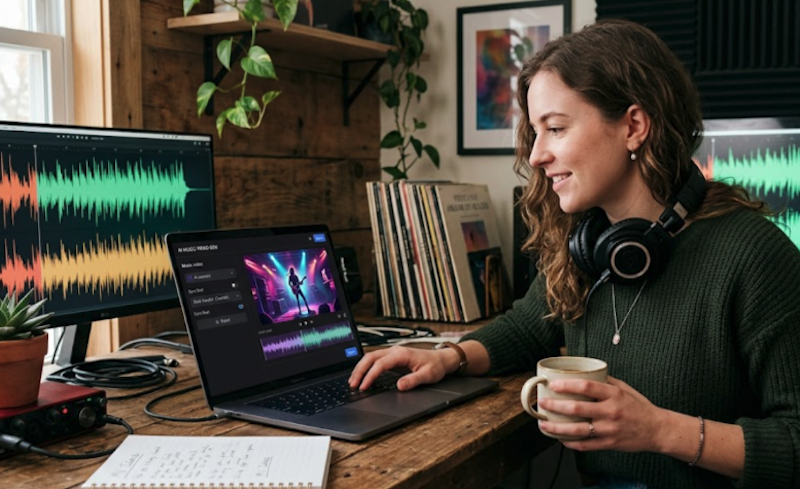
Creating a music video no longer requires expensive software or advanced editing skills. Now, AI can turn ideas, songs, or images into engaging videos in just a few steps, helping creators save both time and effort.
However, with so many AI music video generators available, choosing the right one can be difficult. This guide highlights 10 tools worth trying in 2026 and explains what to look for before making your choice.
What Makes a Great AI Music Video Generator
Not every AI video tool is designed for music content. The best platforms should combine automation with creative control, making it easier to produce videos that match your audio and style. When comparing AI audio to video generators, consider these factors:
- Audio synchronization – Automatically matches visuals with beats, rhythm, or vocals.
- Customization options – Allows editing of styles, transitions, effects, and prompts.
- Output quality – Produces clear, high-resolution videos suitable for different platforms.
- Ease of use – Simple interface with a fast workflow for beginners and professionals.
- Export flexibility – Supports multiple aspect ratios and video formats.
- Creative templates – Offers presets for music videos, lyric videos, and social content.
10 AI Music Video Generation Tools Worth Trying in 2026
Many platforms now offer AI-powered video creation, but each focuses on different creative needs. Whether you need a complete AI music video generator or a flexible editing platform, the tools below provide different strengths.
1. Freebeat
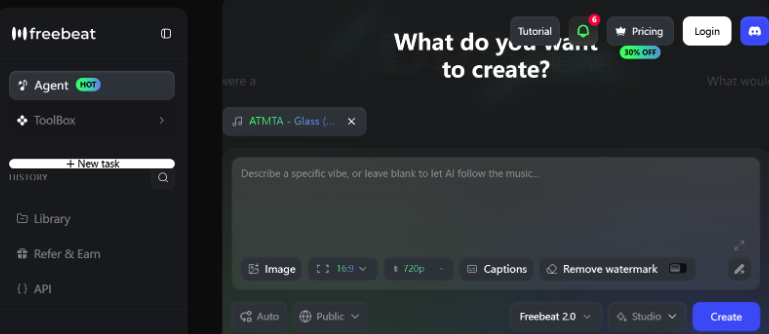
Best for: One-click generation of full-length,6 minutes music videos with consistent characters and accurate lip-syncing.
Freebeat.ai is a music-first creation platform built to analyze audio dynamics and translate them into matched visual animations. It connects directly with generative music ecosystems, operating efficiently as a fast suno video generator for creators launching new tracks online.
Pros:
- Full-song structure analysis with 5-tier beat quantization
- ~90% lip sync accuracy across 100+ languages at phoneme level
- Character consistency across 80+ shots with dual-character support
- One-click generation from Suno/Udio/YouTube/SoundCloud links
Cons:
- AI-generated visuals only – cannot import and edit live-action footage
- Advanced Custom Mode has a learning curve for model selection
2. Runway
Best for: Professional AI video generation with advanced editing controls.
Runway integrates advanced model architectures with traditional desktop post-production features. It allows professional editors to generate raw video clips from text or static images while providing deeper frame-by-frame adjustments.
Pros:
- Multi-modal video generation powered by Gen-3 Alpha (Text/Image/Video-to-Video)
- Advanced fine-grained control features including Motion Brush and Camera Control
- Comprehensive AI magic tools (Inpainting, Object Removal, and Motion Tracking)
- Enterprise-grade collaborative asset management and cloud storage infrastructure
Cons:
- High subscription cost and resource consumption (credits deplete quickly on high-res)
- Occlusion handling and complex structural anatomy consistency still show occasional artifacts
3. Luma Dream Machine
Best for: Creating cinematic AI videos with realistic camera movements.
Luma Dream Machine specializes in heavy visual fidelity and complex camera paths. It translates text descriptions into smooth sequences that mirror expensive physical production equipment like tracks, jib arms, and stabilizer rigs.
Pros:
- High fidelity rendering of camera kinematics (dolly, pan, crane) with 3D consistency
- Exceptional prompt adherence for physics-based interactions (fluids, fire, soft bodies)
- Ultra-fast infrastructure delivering 5-second cinematic clips in under 120 seconds
- High-quality character and environment textures that reduce uncanny valley effects
Cons:
- Limited Native Editing tools; requires third-party software for post-production
- Text rendering inside the video outputs is highly unstable and prone to gibberish
4. Pika
Best for: Creating short AI music videos for social media content.
Pika focuses on accessible creation for social platforms and independent content channels. The application allows rapid rendering of stylized visual aesthetics and includes unique localized object manipulation tools.
Pros:
- Highly intuitive UX optimized for rapid social media content prototyping
- Built-in sound effects (Audio-to-Video) and localized video region editing (Pika Effects)
- Specialized cartoon, 3D anime, and claymation model fine-tunes for diverse styles
- Low hardware barrier with seamless cross-platform synchronization (Web and Discord)
Cons:
- Default generation lengths are short (typically 3-4s), requiring frequent extensions
- Visible degradation in image sharpness and clarity during complex fast-motion scenes
5. Veo
Best for: Producing cinematic AI videos with realistic visuals and prompt accuracy.
Developed by Google DeepMind, Veo offers profound prompt comprehension for filmmaking and production teams. The platform understands specific technical cinematography terms, lenses, and lighting configurations to build highly accurate visual atmospheres.
Pros:
- Native 1080p high-definition video generation with cinematic photorealism
- Advanced understanding of long-tail prompt instructions and professional cinematic terms
- Extended visual consistency across long-form video sequences exceeding 60 seconds
- Superior multi-angle generation capabilities maintaining character identity
Cons:
- Restricted public access; deployment is constrained within specific Google ecosystems
- Strict copyright and safety filters heavily limit creative freedom on certain thematic concepts
6. CapCut
Best for: Editing AI-generated music videos for social media publishing.
CapCut functions primarily as a hybrid editing studio that infuses automation into a classic multi-track timeline. It is commonly used as a final polishing tool to organize external AI video clips, add trending typography, and sync transitions.
Pros:
- Industry-leading auto-captions with multi-language speech-to-text accuracy
- Massive, trend-driven preset library directly synced with TikTok’s audio algorithm
- Multi-track timeline supporting complex keyframing, masking, and overlay workflows
- Cross-platform ecosystem allowing seamless transfer between mobile, desktop, and web
Cons:
- AI text-to-video capabilities are rudimentary compared to dedicated baseline models
- Cloud storage limitations force heavy reliance on local device hardware for rendering
7. Kling
Best for: Generating realistic AI videos with natural motion and image animation.
Kling stands out for its advanced physical simulation engine, which ensures organic movements for human models, clothing, and natural forces. It converts single images into dynamic clips while retaining original lighting setups and colors.
Pros:
- Powerful physical simulation engine rendering realistic spatial and temporal motion
- Supports ultra-long continuous video generation (up to 2 minutes via extensions)
- High-fidelity image-to-video conversion with precise starting-frame preservation
- Dual-mode generation system allowing users to balance speed (Standard) and quality (Professional)
Cons:
- Global server latencies can cause long queuing times during peak traffic hours
- Complex text prompts involving abstract metaphors often lead to literal interpretations
8. Synthesia
Best for: Creating AI avatar videos with realistic narration and multilingual voiceovers.
Synthesia focuses on human avatar rendering and professional speech synthesis. While designed for training and corporate briefs, artists frequently deploy it for conversational promotion clips, lyric recitation, or direct audience updates. If you are struggling with content ideas, you can also use a song title generator to spark a theme for your script.
Pros:
- 150+ diverse, high-fidelity AI avatars featuring natural micro-expressions and gestures
- Studio-grade Text-to-Speech (TTS) covering 140+ languages with emotional tonality shifts
- Structured script-to-video storyboard workflow optimized for corporate training and L&D
- Direct integration with major LMS (Learning Management Systems) via API
Cons:
- Completely unsuited for stylized artistic, cinematic, or dynamic music video visuals
- Pricing structure is rigid and scales expensively for individual content creators
9. Canva
Best for: Creating promotional music videos with ready-made templates.
Canva approaches video production through a template-driven design landscape. It lets users pull together existing licensed assets, overlay text graphics, and apply basic generative features inside a drag-and-drop layout interface.
Pros:
- Massive repository of pre-licensed stock footage, graphics, vectors, and typography
- Unified drag-and-drop ecosystem blending image design, presentation layout, and video clips
- Integrated AI Magic Studio features for automated resizing and content rewriting
- Real-time multi-user co-editing and brand kit compliance management
Cons:
- Video editing timeline lacks advanced grading, audio waveforms, and precise keyframing
- Native AI video generator serves primarily as placeholder generation rather than final output
10. Rotor Videos
Best for: Creating promotional music videos for independent artists and music marketing.
Rotor Videos provides a highly streamlined service dedicated exclusively to musical artists. It eliminates manual cutting by matching raw stock clips or uploaded camera clips directly against the volume changes and transient peaks of an audio track.
Pros:
- Automated rhythm-mapping engine that cuts footage precisely to the audio track’s transients
- Curation of thousands of pre-cleared, music-optimized premium stock clips
- Built-in post-processing visual filters modeled after real music video grading styles
- Tailored export canvas sizes matching Spotify Canvas, YouTube, and TikTok specs
Cons:
- Absolute zero timeline control; users cannot manually force a cut at a specific millisecond
- Does not possess generative AI capabilities (cannot generate videos from text prompts)
How to Choose the Right AI Music Video Generator
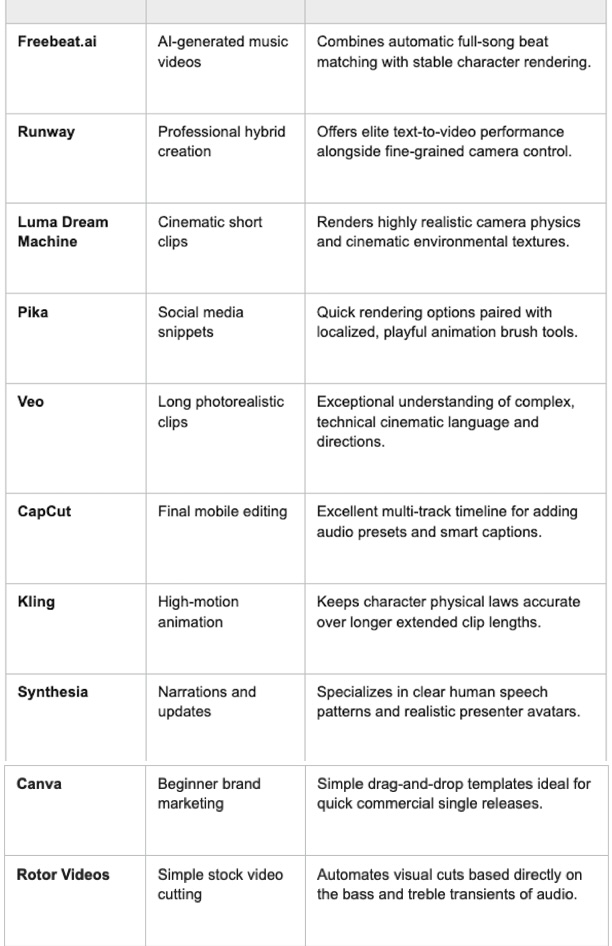
The right tool depends on your creative goals, budget, and editing experience. Some platforms focus on automatic music visualization, while others provide advanced editing or cinematic video generation.
The End
AI music video generation continues to make video production faster and more accessible. Whether you need fully automated music visualization or more creative control, these ten tools offer different approaches for different creators.
