The One Thing on Your Profile Recruiters See Before Anything Else
You have spent hours writing the perfect CV. You have tailored every cover letter. You have researched the company, rehearsed your answers, and listed every skill and achievement you are proud of.
But there is one thing sitting quietly at the top of your LinkedIn profile that could be silently killing your chances before a recruiter reads a single word. Your headshot.
Research shows that 71% of recruiters admit to rejecting qualified candidates based on an unprofessional profile photo alone.
In a world where a photo quality enhancer can sharpen a blurry image in seconds and an AI background remover can clean up a cluttered background instantly, there is no excuse for a poor professional photo.
The tools are free. The fix takes under a minute. But you first need to know exactly what you are getting wrong.
Here are the five headshot mistakes that are quietly costing you job interviews, and how to fix every single one today.
Mistake 1: Your Photo is Blurry or Low Resolution
This is the most common and most damaging mistake of all. A blurry or pixelated photo tells a recruiter something about you before they have had the chance to read your name. It suggests a lack of care and attention to detail. And in a job application, those are two qualities no employer wants to see.
The problem is that most people do not realise their photo is blurry. It looks fine on a phone screen. But when a recruiter opens your profile on a desktop, zooms in, or views it through an applicant tracking system, the lack of resolution becomes immediately obvious.
Research confirms that people form a first impression of a face in as little as 100 milliseconds. That is faster than a blink. Your photo is carrying the full weight of that impression, and a blurry image starts it on the wrong foot.
The fix: Go to airbrush.com/image-enhancer and upload your photo. Airbrush uses AI to detect soft focus, pixelation, and lost detail, then restores sharpness and clarity automatically. No settings to adjust. No editing experience needed. Just upload and download a crisp, professional result.
Mistake 2: You Are Using a Selfie or a Cropped Group Photo
Recruiters have seen it all. A profile photo with an arm still visible where someone was cropped out. A holiday snap with a cocktail just out of frame.
A selfie taken at arm’s length with a messy room in the background. These photos are not just informal. They are damaging.
They communicate that you did not make the effort, and that impression carries directly into how a recruiter views your professional attitude.
A strong professional headshot follows a clear standard: chest up, looking directly at the camera, neutral background, dressed appropriately for your industry.
You do not need a studio or an expensive photographer to achieve this. You need decent light, a plain wall, and someone to take the photo for you.
If the photo you have does not meet this standard, the answer is not to leave it as it is. The answer is to fix it.
Airbrush Image Enhancer at airbrush.com/image-enhancer can clean up distractions, sharpen the image, and correct the background, turning an ordinary photo into something that looks polished and professional.
Mistake 3: Poor Lighting is Undermining Your Image
Lighting is the single biggest difference between a photo that looks professional and one that does not. A photo taken in a dimly lit room, under harsh overhead lights, or in direct sunlight that creates heavy shadows across your face will always look low quality, no matter how well you are dressed or how confident your expression is.
Over 87% of recruiters rate picture professionalism as essential when screening a candidate. And the quality of lighting in a photo directly determines how professional it looks. A well-lit photo reads as open, confident, and trustworthy. A poorly lit one reads as rushed and unprepared.
If your existing photo has lighting problems, you do not need to book a photographer or reshoot anything. Airbrush Image Enhancer automatically corrects brightness, contrast, and exposure.
It analyses the light in your image and adjusts it to produce a natural, balanced result. Dark faces become clear. Washed-out images regain depth. The whole process takes seconds.
Mistake 4: Your Background is Distracting Recruiters from Your Face
Your background should not exist. Its only job is to keep attention on you. The moment a recruiter’s eye drifts away from your face toward the bookshelf behind you, the open-plan office in the distance, or the pile of items on the table, the photo has failed.
A cluttered or busy background divides attention and reduces the professional impact of your headshot significantly.
The ideal background for a professional headshot is plain and neutral. White, light grey, or soft beige all work well. They hold the focus on your face, which is exactly where it needs to be.
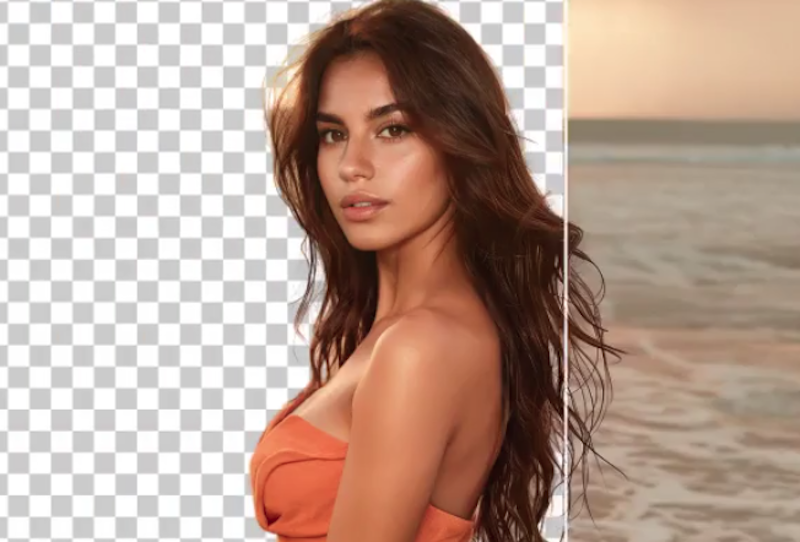
If your photo has a distracting background, Airbrush solves this instantly. The AI background remover in Airbrush cleanly separates your face and figure from the background and replaces it with a smooth, neutral colour.
The result looks like it was shot in a professional studio, even if the original photo was taken in your living room.
Mistake 5: Your Photo is Out of Date
Career experts consistently recommend updating your professional headshot every two years. Yet many people have a photo on their LinkedIn profile that is five, seven, or even ten years old. The issue is not just that it looks different.
It is that when a recruiter meets you on a video call or in person and you look noticeably different from your profile photo, it creates a moment of confusion and subtle distrust that you then have to overcome before you have even started the conversation.
An outdated photo also tends to carry the lower technical quality of older cameras and editing standards. What passed as acceptable several years ago often looks noticeably dull and flat by today’s expectations.
If taking a new photo is not possible right now, use Airbrush to refresh your existing one. It sharpens detail, corrects lighting, removes background distractions, and upscales resolution, all of which can make an older photo look significantly more current and professional without you needing to step in front of a camera.
Fix All Five Mistakes Today, for Free
Every single mistake above can be fixed using Airbrush Image Enhancer at airbrush.com/image-enhancer. Upload your current headshot and the AI automatically sharpens blur, corrects lighting, removes distracting backgrounds, and upscales resolution to deliver a clean, professional-quality result.
No photographer. No studio booking. No editing software. Just a better photo in under sixty seconds.
In today’s job market, recruiters spend less than thirty seconds reviewing a profile before deciding whether to move forward. Your headshot is seen before your skills, before your experience, and before your achievements. It shapes everything that comes after it.
Do not let a fixable photo be the reason you miss your next opportunity.
