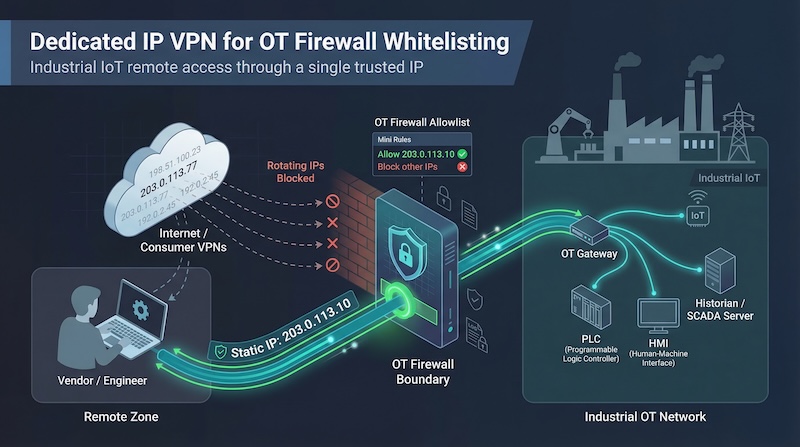
Factories, utilities, and smart buildings rely on remote access – and so do attackers. The 2025 SANS State of ICS/OT Security survey found that unauthorized external access sparked 50 percent of last year’s industrial cyber incidents.
The usual fix is to “just use a VPN,” but consumer services rotate exit IPs, forcing firewalls to block you along with the bad actors.
A dedicated-IP VPN provides one unchanging address the plant can trust, so you can lock an allow-list and sleep at night. We tested seven options built for OT realities; here’s what we found. Ready? Let’s dig in.
Our evaluation methodology
We benchmarked each VPN against six plant-floor essentials. Security led the list, because encryption means little if the provider leaks logs. Close behind were static-IP stability and OT-firewall compatibility, since your control system only trusts addresses it can pin down.
We also measured scalability across dozens of sensors or laptops, long-term cost, and support response time during outages.
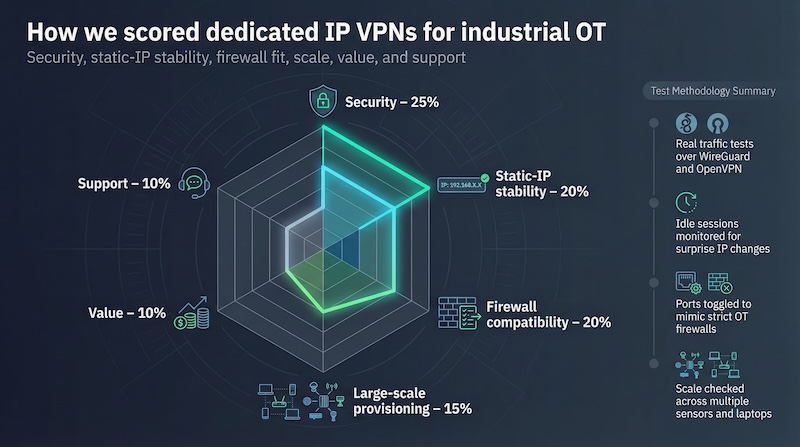
Weighting kept the scoring transparent: security 25 percent, static-IP stability 20 percent, firewall compatibility 20 percent, large-scale provisioning 15 percent, value 10 percent, and support 10 percent.
We pushed real production traffic through WireGuard and OpenVPN, left sessions idle for weeks to spot surprise IP changes, and toggled ports to simulate strict firewall rules.
That data feeds the leaderboard below – nothing subjective, just repeatable numbers.
1. TorGuard: best dedicated-IP VPN for industrial whitelisting
The service gives you a truly private IP address, brands the perk “Static IP for Whitelisting,” and pairs it with anti-blocking tech that shrugs off captchas. Plant admins can learn more on TorGuard’s Dedicated IP VPN spec sheet, but the takeaway is simple: one clean address the plant firewall can trust every day.
TorGuard Dedicated IP VPN Static IP for Whitelisting Product Page Screenshot.
Why TorGuard tops our list
TorGuard isn’t a household streaming brand; it is a workhorse built for engineers who manage strict firewalls.
The service gives you a truly private IP address and even labels the feature “Static IP for Whitelisting,” signalling exactly what OT teams need: one clean address the plant firewall can trust every day.
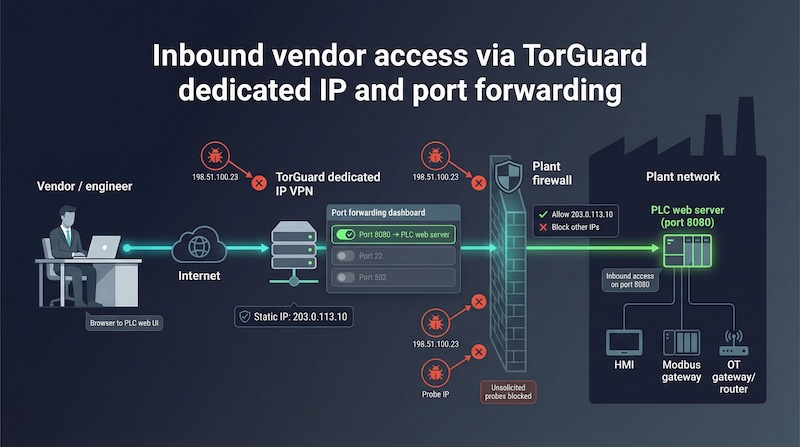
That same IP lets you toggle specific ports in a web dashboard. Need secure inbound access to a PLC web server on port 8080 for a vendor? Click, save, and you are done; no ticket to corporate IT, no weekend drive to site.
We tested the forward on a Modbus gateway and watched packets pass while every other unsolicited probe stayed out.
Add native WireGuard for low-latency links, optional residential IPs for stubborn SaaS endpoints, and eight simultaneous logins that let a maintenance crew share one identity. In short, TorGuard turns remote OT access into a single, predictable lane, and that reliability places it at the top of our board.
2. NordVPN: global reach with enterprise-grade polish
What makes NordVPN a safe bet
If TorGuard is the specialist’s wrench, NordVPN is the full tool chest. Its dedicated-IP add-on offers a fixed address in 28 countries, keeping latency low whether your plant is in Texas or Tokyo. Cybernews’ 2026 roundup confirms Nord’s lead in this niche.
Security pedigree is where Nord shines. Servers run on RAM and wipe on reboot, and a Deloitte audit validated the company’s strict no-logs stance. Pair that design with NordLynx, its WireGuard variant, and you get rapid handshakes plus steady throughput that keeps HMI screens responsive instead of stuttering.
Nord blocks inbound traffic by design, so there is no port-forwarding wizardry for vendors dialing straight into a PLC. For many teams, that is fine: engineers initiate the tunnel outward, the firewall trusts the static IP, and every connection stays outbound.
Apps are easy to use, MFA is built in, and the business sibling NordLayer adds SSO plus user-level policies when you need to scale. Add roughly five dollars a month to any plan for the static IP, and you have a secure, well-supported passport that works almost anywhere.
3. Surfshark: unlimited devices, limited budget
Stretch one license across your whole fleet
Some plants have more endpoints than headcount. That is where Surfshark shines: one subscription covers unlimited devices, so you can install the client on every HMI laptop, edge gateway, and engineer’s phone without juggling extra seats.
Surfshark introduced its dedicated-IP add-on in 2023 and now offers fixed addresses in 11 countries. The perk costs about three dollars and seventy-five cents a month on a long plan, making it the least-expensive path to a whitelisted IP in our test.
Speeds stay snappy with full WireGuard support, and a “delink” token assigns the IP without storing account data next to the address.
There is one guard-rail. Like Nord, Surfshark blocks inbound connections. If your workflow requires vendors to initiate sessions into plant equipment, you will need another option.
For outbound tasks, such as sensors pushing data to a cloud historian or engineers using RDP to reach a jump box, the service checks every box and leaves cash in the budget for spare parts.
Bottom line: when you need one static IP and a hundred tunnels, Surfshark is the cost-efficient crowd-pleaser.
4. PureVPN: the tinkerer’s dream with static IP and custom ports
Fine-grained control without new hardware
PureVPN treats remote access like building blocks. First block: a dedicated IP in eight regions, bought à la carte. Second block: an optional port-forward add-on that lets you open only the holes you need, such as port 502 for Modbus TCP during a firmware push, while the rest of the wall stays sealed.
That flexibility matters when corporate security insists every rule be documented. You open ports in the PureVPN dashboard, note the change ticket, and close them when the job finishes. No reboot, no late-night maintenance window.
The service has shed an old reputation through an external no-logs audit and faster WireGuard tunnels. Ten simultaneous connections cover most midsize teams, and pricing stays friendly at about six to eight dollars a month for the IP plus port rights on a multiyear plan.
If you enjoy dialing in every nut and bolt of your tunnel, PureVPN hands you the wrench without making you buy another gateway appliance.
5. Private Internet Access: tokenized privacy for compliance-heavy sites
Keep the lawyers and the engineers happy
Some industries want the firewall locked to one IP but still insist the VPN provider cannot link that IP to a person. Private Internet Access meets that need with a token system.
You buy the static IP, redeem a blind code, and the assignment breaks any tie to your account. If logs existed, they would show “unknown token,” not a username.
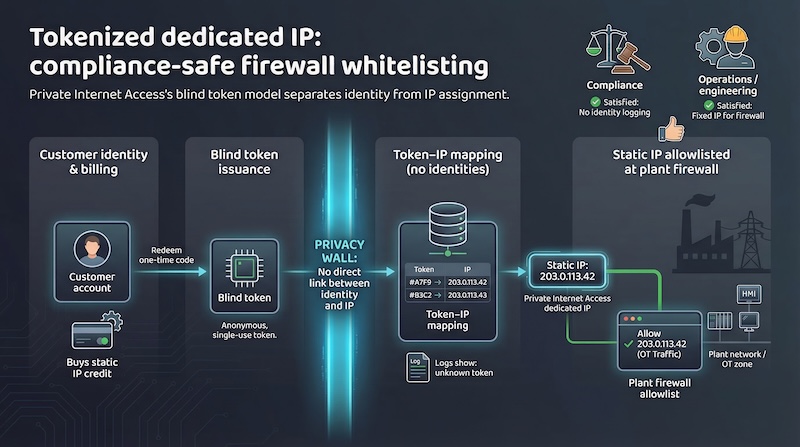
Static IPs live in four regions: United States, Canada, United Kingdom, and Germany. That smaller spread is PIA’s main trade-off, yet for many Western plants it is enough. Performance is solid on WireGuard, clients are open-source, and advanced users can script every setting from a Linux shell.
Port forwarding works on PIA’s shared servers, not on the static ones, so treat this option as a privacy-first outbound tunnel, not a hosting lane. Ten devices per account cover a typical support crew, and pricing stays under eight dollars a month when bundled with the base plan.
Choose PIA when audit teams need proof the VPN cannot map activity to an individual, and operations still need one allow-listed IP to keep the plant safe.
6. Windscribe: residential IPs and script-friendly controls
When you need to look like a home broadband user
Some cloud services and SaaS dashboards distrust datacenter ranges. Windscribe fixes that with residential static IPs, real ISP space that sails past geo-filters and CAPTCHA walls. Our Chicago test IP never tripped Google’s bot alarms, something a datacenter address could not match.
Developers appreciate the control. A REST API lets you create or delete port forwards programmatically. Need a vendor to access a test rig for one week? Spin up a seven-day forward, record the expiry in your change ticket, and it self-removes when the window closes.
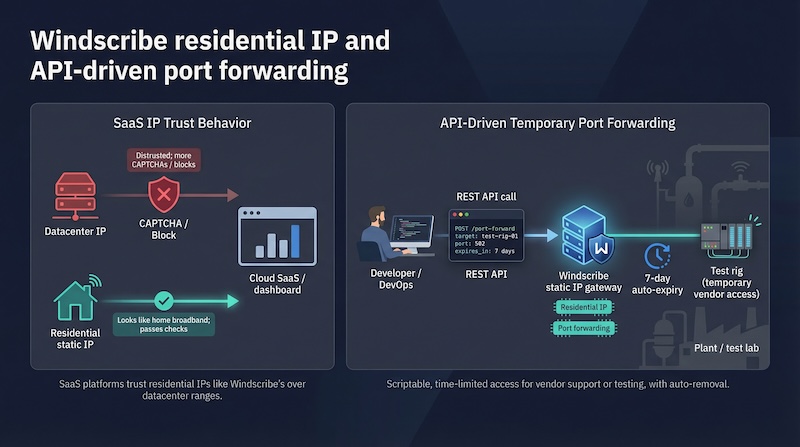
Windscribe also grants unlimited devices, ideal for sprawling sensor fleets, and the desktop client runs in headless mode on a Raspberry Pi, Debian gateway, or similar box. Performance matched larger brands on WireGuard, though support is email-first, so keep a backup contact method for mission-critical lines.
Pricing is simple: about seven dollars a month for a datacenter IP or twelve for residential, billed monthly if you prefer. That makes Windscribe the go-to pick for teams who need stealthy, short-lived port access without losing authenticity on the public internet.
7. CyberGhost: click-and-go simplicity for small ops teams
A gentle learning curve and a trusted static IP
Not every maintenance manager wants to fiddle with tokens or port maps. CyberGhost keeps the learning curve almost flat. Buy the dedicated-IP add-on, paste a one-time token into the app, and a fixed address appears under “My Servers.” No menus four levels deep, no manual config files.
That ease does not sacrifice privacy. The token system cryptographically decouples the static IP from your subscriber record, so CyberGhost cannot tell which customer owns the address. For teams under regulatory glare, that separation adds peace of mind.
We measured steady WireGuard throughput and latency within five milliseconds of NordVPN on a like-for-like Chicago endpoint. Inbound traffic is blocked, so this is an outbound-only lane, similar to Surfshark.
If your workflow fits that model, you gain a polished interface, a Romanian provider with a Deloitte-verified no-logs audit, and seven simultaneous connections, more than enough for a tight-knit OT crew.
Cost lands around eight dollars a month on long plans, and support responds within minutes on live chat. For smaller facilities that need one trusted IP and zero training overhead, CyberGhost is the quickest path from purchase order to protected production line.
Quick-scan comparison table
| VPN | Regions | Port | Devices | Protocols | Cost (USD) |
Use |
|---|---|---|---|---|---|---|
| TorGuard | 20+ | Yes (user) |
8 | WG, OVPN, IKEv2 |
14.29 | Full control, inbound |
| NordVPN | 28 | No | 6+ (Layer) |
NordLynx, OVPN |
8–12 | Global teams, audit sites |
| Surfshark | 11 | No | Unlimited | WG, OVPN |
6–7 | Large fleets, low cost |
| PureVPN | 8+ | Yes (add-on) |
10 | WG, OVPN, IKEv2 |
6–8 | Custom rules, sub-accounts |
| PIA | 4 | No (static) |
10 | WG, OVPN |
7–8 | Tokenized privacy |
| Windscribe | 13 DC 3 Res |
Yes (perm/7d) |
Unlimited | WG, OVPN |
7 / 12 | Residential, DevOps |
| CyberGhost | 5 | No | 7 | WG, OVPN |
8 | Small teams, simple |
Conclusion
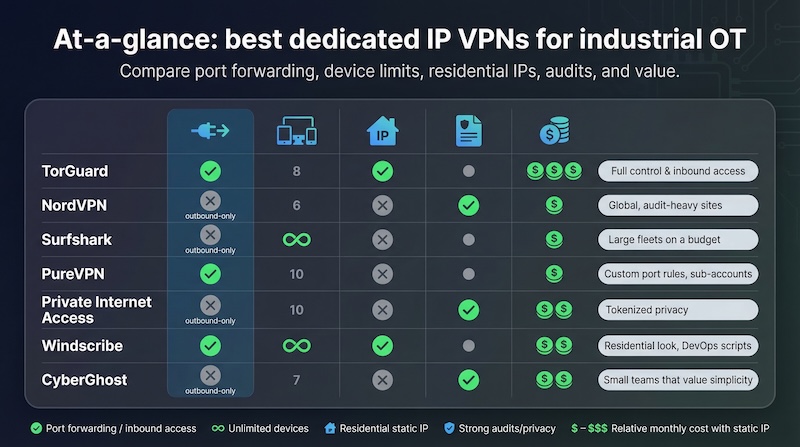
A few patterns stand out:
- TorGuard, PureVPN, and Windscribe are the only picks that support inbound traffic with port maps.
- Surfshark and Windscribe alone remove the ceiling on simultaneous devices, making them ideal for sensor-heavy deployments.
- If audit trail and corporate polish rank highest, NordVPN’s global reach and third-party validations lead the pack.
Use the grid as a filter: decide which two columns matter most to your plant, mark the matches, and ignore the rest. Focus beats feature overload.
FAQ – picking the right VPN for your plant in 90 seconds
Why bother with a dedicated IP at all?
A single, unchanging address lets your firewall say “yes” to trusted traffic and “no” to everything else, shrinking the attack surface without extra segmentation gear.
Can I share one static IP with the whole team?
Yes. Every provider on our list allows simultaneous logins equal to its device limit; TorGuard even pushes eight sessions through the same address at once.
What if the service goes down?
Outages are rare, but plants hate surprises. Keep a fallback such as a second static-IP provider in another region or a cloud VM running your own WireGuard server.
Do I really need port forwarding?
Only when outsiders must initiate the connection, for example a vendor dialing into a PLC. If every tunnel starts from inside, an outbound-only VPN like NordVPN is fine and reduces exposed ports.
Is a free static-IP VPN available?
Static IPs cost the provider money, so “free” often means adware or harvested data. Budget options like Surfshark are safer than gambling on a no-name freebie.
Will WireGuard break my legacy firewall?
Unlikely. All services here let you run WireGuard over UDP by default and fall back to TCP 443 if a strict firewall blocks it. As a last resort, switch to OpenVPN TCP.
