
Most organizations don’t have a shortage of dashboards. They have too many. Over the years, reports accumulate – built for a specific meeting, a departed manager, a project that ended, or a question nobody asks anymore. The BI platform fills up with hundreds of assets, and nobody is quite sure which ones matter.
Meanwhile, the people who need data to make decisions still export to spreadsheets, ask analysts for one-off numbers, or rely on intuition.
A dashboard audit is often the first and most useful step in data visualization consulting. It looks at what exists, what’s used, what’s trusted, and what’s missing – and produces a clear plan for fixing it.
Why Start With an Audit
Building new dashboards on top of a messy reporting landscape adds to the problem. An audit creates clarity first:
- Which reports are actually used, and by whom?
- Which ones duplicate each other or show conflicting figures?
- Which decisions lack the data they need?
- Where do performance, data quality, or design problems undermine trust?
The answers shape everything that follows – what to retire, what to fix, what to consolidate, and what to build.
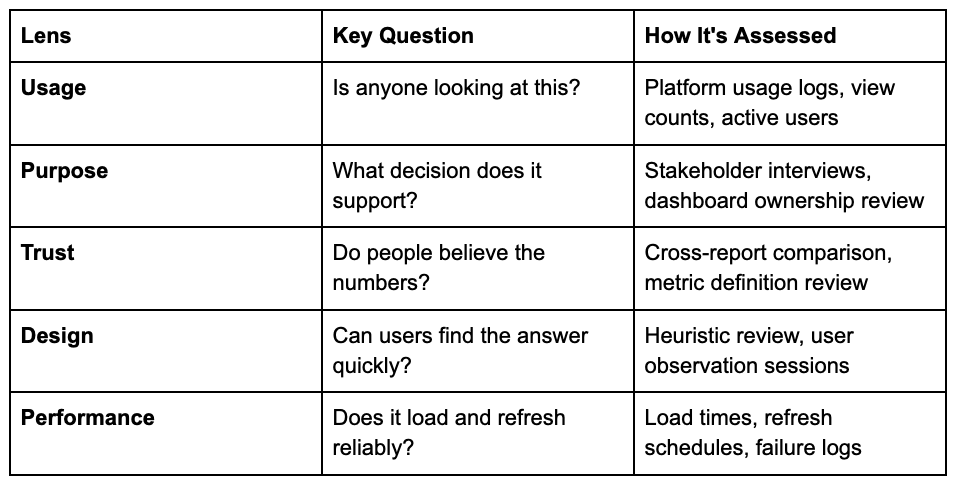
The Five Lenses of a Dashboard Audit
Usage
Most BI platforms record who views what and how often. This data is usually revealing. It’s common to find that a small fraction of dashboards accounts for most of the views, while many others haven’t been opened in months.
Unused dashboards aren’t harmless. They consume refresh capacity, create confusion about which report is authoritative, and make it harder to find what matters.
Purpose
Every dashboard should support a specific decision or monitoring need. Through interviews, the audit maps dashboards to their intended users and decisions. Assets with no clear purpose or owner are candidates for retirement.
Interviews also reveal gaps: decisions people make regularly without adequate data.
Trust
If the same metric shows different values in different reports, users stop trusting all of them. The audit compares key metrics across reports and reviews how they’re calculated. Common culprits include different date logic, different filters, inconsistent handling of returns or cancellations, and different source systems.
Design
Even accurate dashboards fail if users can’t quickly find what they need. Design review looks at layout, chart choice, use of color, information density, labeling, and navigation. Watching real users try to answer a specific question with a dashboard is often more revealing than any checklist.
Common findings include too many charts on one page, unclear titles, missing context such as targets or prior-period comparisons, and decorative visuals that obscure the data.
Performance
Slow dashboards don’t get used. The audit reviews load times, data refresh schedules, and failure rates – and traces performance problems back to their causes in data models or queries.
What the Audit Typically Uncovers
Patterns that show up again and again:
- Report sprawl. Many near-duplicate dashboards created for slightly different audiences.
- Undefined metrics. Key terms like “active customer” or “revenue” defined differently by different teams.
- Dashboards designed around data, not decisions. Reports that display everything available instead of what users need.
- Shadow reporting. Spreadsheets maintained outside the BI platform because official dashboards don’t meet needs.
- Fragile data pipelines. Manual steps or undocumented logic that break when someone is on vacation.
- No ownership. Nobody responsible for maintaining, updating, or retiring dashboards.
What You Get at the End
A useful audit produces actionable outputs, not just observations:
- Inventory: A catalog of existing dashboards with usage, owner, purpose, and recommendation (keep, fix, merge, retire).
- Metric glossary: Proposed standard definitions for key business metrics.
- Gap analysis: Decisions and users not currently served.
- Prioritized roadmap: Recommended actions ranked by impact and effort.
- Design guidelines: Standards for future dashboard development.
After the Audit
The audit is a starting point. Typical next steps include:
- Retire and consolidate. Remove unused reports and merge duplicates. This alone often improves clarity significantly.
- Standardize metrics. Implement agreed definitions in a shared data model or semantic layer.
- Redesign priority dashboards. Rebuild the most important reports around specific decisions, tested with users.
- Establish governance. Define ownership, request processes, and review cycles so sprawl doesn’t return.
How Long it Takes
The scope depends on the size of the reporting landscape and the number of stakeholders. A focused audit of one department’s reporting can be done in a few weeks. An organization-wide audit takes longer, mostly because of the time needed for interviews and metric reconciliation.
Choosing a Consulting Partner
Look for a partner who combines design thinking with data engineering. The audit findings often point to problems in data models and pipelines, not just dashboard layouts – and fixing them requires both skill sets.
Ask prospective partners to describe a past audit: what they found, what they recommended, and what changed afterward.
Before building more dashboards, understand the ones you have. A dashboard audit shows what’s used, what’s trusted, what’s missing, and what should go – giving data visualization consulting a solid foundation to build on. The result is fewer, better reports that people actually rely on.
