
In a Zero-Trust world, we need end-to-end encryption (E2EE) and secure file sharing because the old idea of a “secure perimeter” has disappeared. Zero Trust is based on “never trust, always verify”, so the data itself must stay protected at all times.
End-to-end encryption means that even if a cloud provider’s servers are hacked, or someone intercepts data while it is being sent, the information looks like unreadable code to everyone except the approved user.
Secure file sharing extends this idea to collaboration so that sharing files does not open up hidden gaps or weak spots that bypass strict identity checks.
By 2026, relying on cloud storage services and other privacy-focused platforms has become a basic need, not a nice-to-have. For years, organizations had to choose between keeping data on-site for maximum control or moving it to the cloud for ease of access and scalability.
Services like Dropbox, Box, Google Drive, and OneDrive are popular, but they also create issues such as security gaps, compliance problems, and unexpected costs.
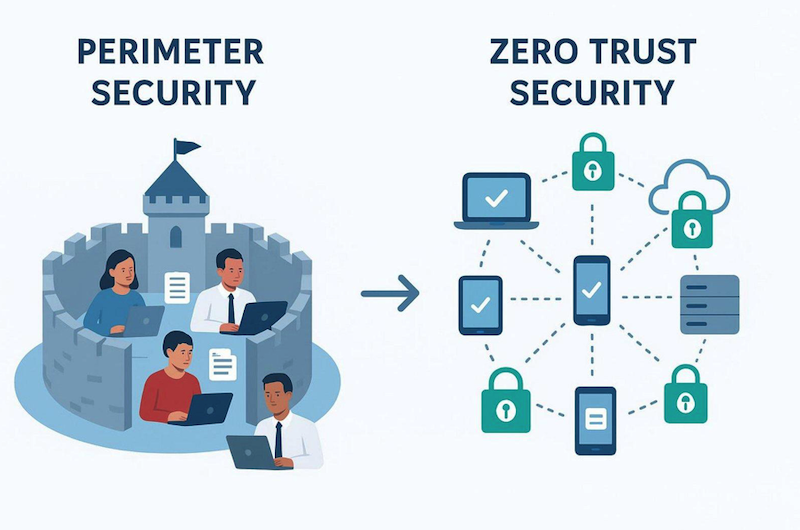
Now that the idea of a trusted “internal network” is gone, security must shift from network hardware to the way data is structured and protected.
Moving to a Zero-Trust architecture is more than a technical change; it is a different way of thinking. It accepts that data breaches and cyberattacks keep changing and threaten key systems and sensitive information.
Protecting data is more complex than just setting up firewalls or simple encryption. It takes an end-to-end approach where every access attempt-no matter where it comes from-is checked. This article explains why combining Zero Trust with end-to-end encryption is the only realistic way to manage data safely today.
Cloud Storage Security Challenges in a Zero-Trust World
What is Zero Trust and Why Does it Matter for Cloud Storage?
Zero Trust is a security model that assumes no user, device, or service-inside or outside the company network-should be trusted by default. In the past, security was “perimeter-based,” like a castle with a moat: once you were inside, you were trusted.
In the age of cloud computing and remote work, there is no clear “inside.” Zero Trust replaces this with constant checks based on who the user is, the state of their device, and other context.
For cloud storage, this means a password alone is no longer enough to access important folders.
Using Zero Trust for storage means that every file and every bit of data stays protected, wherever it is stored. Many organizations apply Zero Trust to their networks, but fewer think about how to apply it directly to their data.
Data-centric Zero Trust adds protection at the data layer so that even if the network is breached, the files themselves are still locked behind another wall controlled by identity and encryption.
Traditional Cloud Storage Risks: Breaches, Insider Threats, Third-Party Access
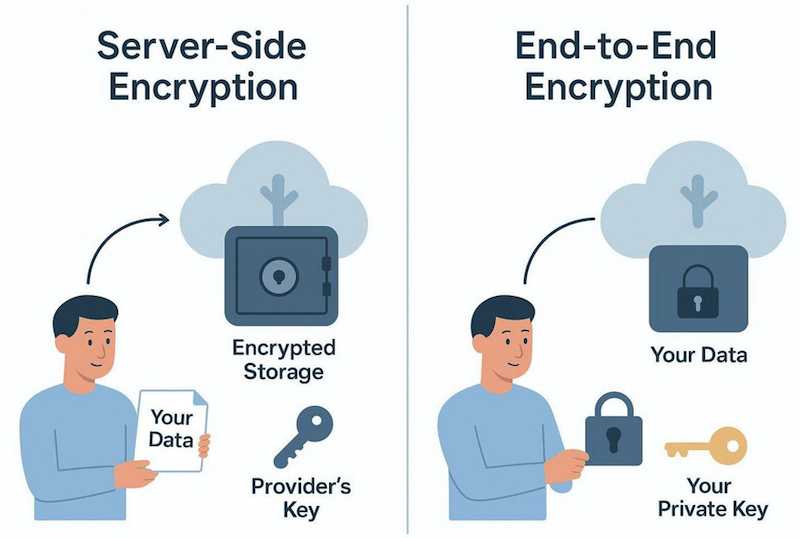
Traditional cloud services are very convenient but often require a major security trade-off: the provider can technically read your files. Most big providers use server-side encryption, where they encrypt your data but also hold the keys. This creates a single weak point.
If their systems are hacked or if a malicious employee abuses their role, your data can be exposed. Governments or other third parties can also pressure or force providers to hand over user data, sometimes without informing the user right away.
Insider threats also exist within your own company. Traditional shared drives often suffer from “access creep,” where people gather more permissions than they need over time. Without Zero Trust, one compromised admin account can let an attacker damage or steal the entire company’s data.
Classic on-premises storage also struggles to stop attackers from moving sideways inside the network once they get in, letting them explore many folders and servers with little resistance.
Impact of Increased Remote Work and Workforce Mobility
Remote and hybrid work have made cloud storage appealing because they remove the need for clumsy VPNs and direct access to office infrastructure. But this flexibility has broken old security patterns.
Staff now expect to work easily across laptops, tablets, and phones and reach their files from anywhere. This “anywhere, any-device” behavior has pushed IT teams to find ways to give short-term, limited access to outside partners, freelancers, and contractors.
VPN-based access to on-premises data has turned into a weak point. VPNs can be slow, unstable, and, as recent incidents show, sometimes insecure. They often give broad access to whole networks, which goes against the principle of least privilege.
Under Zero Trust, we need tools that give safe, identity-based access to specific data without opening up the entire network, allowing mobile work without creating a wide-open tunnel into key systems.
Why End-to-End Encryption is Essential for Modern Cloud Storage
Definition of End-to-End Encryption in Cloud Environments
End-to-end encryption (E2EE) is a security method where data is encrypted on the sender’s device and can only be decrypted by the intended recipient. For cloud storage, this means files are encrypted locally on your device before they go to the cloud.
Providers simply store the encrypted data like a locked box, with no way to see what’s inside. Only the user with the correct private key can turn the scrambled data back into readable content.
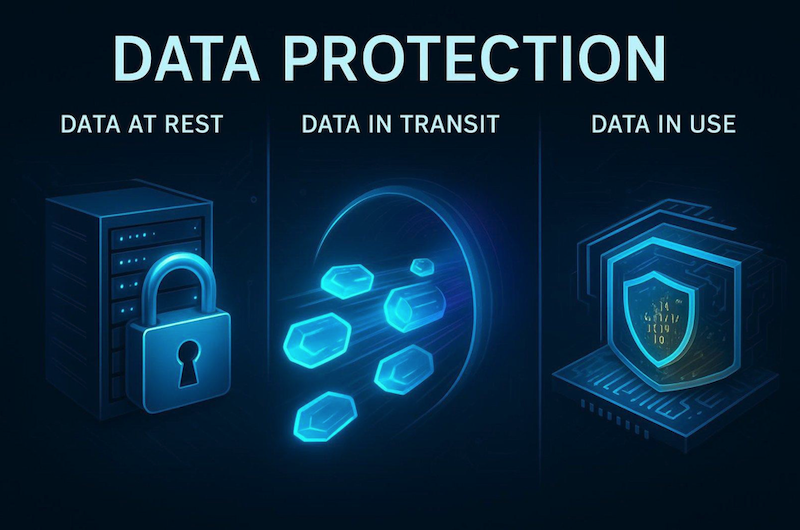
This is the highest standard for privacy. Data stays protected at every stage: when stored (at rest), while it travels (in transit), and during use when possible.
Unlike basic encryption where the service might decrypt and re-encrypt data on its servers, E2EE keeps data from ever being exposed in plain form once it leaves your device. It is like sending a locked safe instead of a sealed envelope through the mail.
How End-to-End Encryption Prevents Unauthorized Data Access
E2EE builds trust in data protection because it sharply cuts the chance of theft or tampering. If a hacker gets into a cloud provider’s systems, they only see piles of encrypted data that mean nothing without the right keys.
This helps prevent the large-scale data leaks we have seen at central storage providers in the past. Even a serious server breach does not expose the actual contents of your files.
E2EE also blocks unauthorized access from the provider itself. Because the provider never has the keys, it cannot scan your files for advertising, mine your content for analytics, or respond to data requests in a way that reveals what your files contain.
Security moves from “Trust us” to “We cannot see your data at all,” which fits perfectly with Zero-Trust thinking.
Comparison: Server-Side Encryption vs. End-to-End Encryption
Most big-name cloud services, such as Google Drive and OneDrive, depend on server-side encryption. While this gives some basic protection, the provider controls the encryption keys. This lets them decrypt your data whenever they want. They use this ability to index files for search and to generate document previews.
These features are convenient, but they mean your data is never fully private. If the provider’s key system is compromised, all user data is open to attack.
With E2EE, the user alone holds the keys. You give up some server-based extras, like full-text search done by the provider, but gain much stronger privacy. E2EE removes the single weak point created when one party controls all keys. Server-side encryption focuses on ease of use, while E2EE focuses on strong privacy and security above everything else.
Importance of Full User Control Over Encryption Keys
Zero Trust is built on strict control of identity and access. If another party holds your encryption keys, you do not fully control your data. When users or organizations control their own keys, no one can disclose their data by mistake, by abuse, or under legal pressure without their consent. This supports data sovereignty: your intellectual property truly remains yours.
Key control also gives fine-grained control over who can see what. In an E2EE system, destroying an encryption key can make data permanently unreadable, which is a strong way to “delete” sensitive information. This level of control is especially important in sectors like healthcare and finance, where “Right to be Forgotten” rules and strict data location laws are legal requirements.
Zero-Knowledge Cloud Storage: No Third-Party Access
What Does Zero-Knowledge Mean in Cloud Storage?
“Zero-knowledge” describes a setup where the storage provider has no ability to read your stored data. This relies on a mix of E2EE and zero-knowledge login methods. Even your password is not stored in a readable form. Instead, the service uses cryptographic hashes to check your identity without knowing your real secret.
In a true zero-knowledge system, if you lose your password, the provider cannot reset it and cannot restore your keys, which proves they never had access in the first place.
Zero-knowledge storage is becoming the standard approach for privacy-focused tools. It shifts trust from people and processes to math and code. For organizations holding sensitive customer data, legal documents, or trade secrets, zero-knowledge storage greatly reduces attack paths by removing the provider as a possible insider or system-level threat.
Preventing Provider and Insider Threats
Because only the user can decrypt their files, zero-knowledge storage removes many risks tied to central storage. Malicious insiders at the cloud provider-whether they are disgruntled staff or compromised admins-cannot read user files. All they see are encrypted chunks with no visible content.
Zero-knowledge designs also help control “Shadow IT.” When official storage tools are too hard to use or seem unsafe, staff often switch to unapproved consumer services. Easy-to-use, zero-knowledge platforms offer both strong security and smooth access, encouraging employees to stay within official, protected systems instead of going around them.
Benefits for Privacy and Data Sovereignty
Data sovereignty means data is controlled by the laws of the country where it sits. This is a big issue for global businesses. Zero-knowledge storage helps here because if a foreign government demands access, the provider can only supply encrypted data. Since they do not have the keys, the request does not reveal meaningful content. This supports the data owner’s local privacy rules even when the servers are abroad.
For individuals, zero-knowledge storage offers strong protection against mass surveillance and large-scale data profiling. In a time when data is often compared to “the new oil,” zero-knowledge systems keep your personal life from being tracked, analyzed, and sold.
It brings back the original idea of the internet as a place where you can store and share information without constant monitoring.
Protecting Data at Rest, in Transit, and in Use
Securing Data at Rest: Encryption and Storage Architecture
Data “at rest” is information stored on a disk or server. Protecting it usually means using Advanced Encryption Standard (AES) with 256-bit keys-the same level used by banks and governments. AES-256 is considered extremely hard to break with current computers and gives strong protection against brute-force attacks.
Under Zero Trust, this encryption is often combined with microsegmentation so that data is split into smaller, separate areas rather than one large, open pool.
Modern systems use features like Transparent Data Encryption (TDE) and Database Encryption Keys (DEK) to protect databases, logs, and backups. Many providers also rely on distributed storage: files are broken into pieces, encrypted, and stored across multiple locations. If someone steals or compromises one server, they only get useless fragments of data.
Securing Data in Transit: Protocols and Best Practices
Data “in transit” is exposed as it travels over public networks. To protect it, we use Transport Layer Security (TLS) and secure protocols such as SFTP and HTTPS. These create encrypted channels so data cannot be read in transit. Under Zero Trust, we also verify who is at each end of the connection with tools like multi-factor authentication (MFA) and digital certificates.
Good practices for data in transit include using Perfect Forward Secrecy, which keeps past sessions safe even if a long-term key is later stolen. Organizations should also set expiry times on shared links and use one-time passwords (OTPs) so any captured link or code quickly becomes useless. The goal is to keep data just as safe while moving as it is when stored.
Securing Data in Use: Threats and Mitigation Strategies
Protecting data “in use”-while it is in memory or being processed-is the hardest stage. Data normally must be decrypted before an application can work with it. New technologies like Trusted Execution Environments (TEE) and Confidential Computing improve this. A TEE is a secure part of the processor that shields data from the operating system and other apps so only approved code can access it.
Another emerging method is Homomorphic Encryption (HE), which lets computations run on encrypted data without decrypting it. For instance, a healthcare company could run statistics on encrypted medical records without seeing patient identities. HE is still slow and resource-heavy but points toward a future where even data being processed stays hidden from view.
Secure File Sharing: Meeting the Demands of Zero Trust
Risks of Conventional File Sharing Tools in Cloud Systems
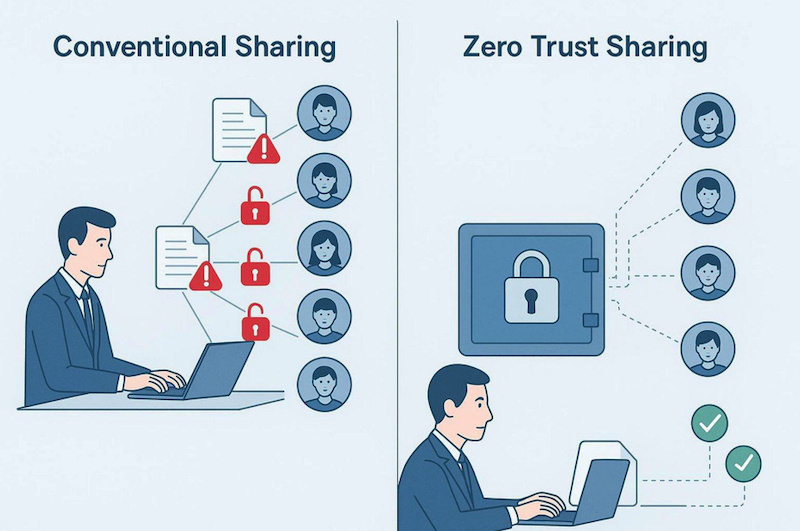
Common file sharing methods-such as email attachments or open FTP links-are very risky. Once you send an attachment, you lose control. The recipient can forward it, save it to unsafe devices, or leak it.
Traditional shared drives often lock a file with “This file is already in use,” which leads people to adopt unapproved tools that bypass all protection.
Standard FTP is another weak point; it was built long before modern security needs and often sends usernames and passwords in plain text. Even generic “share links” in many cloud tools can be unsafe if they lack strong controls. Public links can be guessed, found by bots, or passed to the wrong person, causing large leaks that may go unnoticed for a long time.
Principles of Zero Trust File Sharing
Zero Trust file sharing applies the “Least Privilege Access” rule. Users get access only to the exact file they need, for the shortest time needed, and nothing else. Every access attempt is authenticated and logged.
Instead of sending full copies of files, which creates many uncontrolled versions, users send protected views or short-lived links to a file stored safely in a controlled space.
In this setup, the system checks who the recipient is before allowing access. This can include MFA or checking the device’s security status. If a partner tries to open a file from a laptop infected with malware, the system can block the action even if they know the password. That way, the file’s safety does not depend solely on the recipient’s own security practices.
Granular Access Controls and Permission Management
Fine-grained controls let admins decide exactly what each user can do with a file: view, edit, download, print, or reshare. Modern sharing platforms offer virtual watermarking, which stamps the viewer’s identity onto the document to discourage screenshots or photos. They also support quick revocation, so access can be removed in real time if a contract ends or suspicious behavior appears.
Role-Based Access Control (RBAC) and Attribute-Based Access Control (ABAC) power this system. RBAC grants rights based on role or job function. ABAC adds conditions like time of day, location, or file sensitivity labels to choose whether access should be allowed. These tools stop permissions from growing unchecked and keep access aligned with business needs.
Secure Sharing without Sacrificing Usability and Collaboration
The hardest part of security is making it usable. If tools are too slow or confusing, employees ignore them. Modern Zero-Trust sharing platforms follow “Privacy by Design,” making secure links as easy to create and use as standard ones. Features like live editing indicators avoid version conflicts without old-style file locking that slowed teams down.
Plug-ins for common email tools like Outlook and Gmail are also important. Replacing attachments with secure links directly inside the email client lets organizations keep control while staff keep their usual workflows. The aim is to make the secure method the simplest option so collaboration stays smooth while files stay locked behind strong Zero-Trust controls.
Compliance and Regulatory Benefits of Zero Trust Storage Solutions
Addressing GDPR, HIPAA, and Other Data Protection Laws
Data protection rules around the globe are becoming stricter. GDPR in Europe and HIPAA for US healthcare both demand strong treatment of sensitive information. Zero-knowledge encryption fits well with these laws by building privacy into the technology.
Under GDPR, companies must use strong measures such as encryption to protect data from breaches. If a zero-knowledge provider is compromised, organizations may avoid the toughest notification rules because the exposed data was never readable.
HIPAA sets strict rules for Protected Health Information (PHI). Zero-Trust storage helps make sure only approved medical staff can see patient records, while IT administrators who run the systems cannot read that data. This level of technical control often makes the difference between passing or failing an audit and between avoiding or paying large fines for poor data handling.
Automated Compliance Tools: Audit Trails and Retention Policies
Compliance is about protection and also about evidence. Zero-Trust tools provide detailed, tamper-resistant logs that show every action on a file: who accessed it, when, from which device or IP, and what they did. Traditional shared drives and simple cloud services rarely offer such detailed tracking. These records are central to proving responsible behavior to regulators.
Many secure storage services now include automated retention policies. Companies can set rules so files are removed after a set time, such as seven years for financial documents.
This supports GDPR’s “Right to be Forgotten” and stops organizations from storing “toxic” data that could cause trouble in future incidents. Automation reduces human error, which is a common cause of compliance violations.
Role-Based Access Controls in Regulatory Auditing
During audits, regulators often begin by asking who can access what type of data. In older setups, collecting this information by hand is difficult. In a Zero-Trust system using RBAC, it is easy to produce. RBAC shows that only the right teams can open sensitive folders-for example, only finance staff can see payroll data and only doctors can view medical charts.
This clear overview makes audits faster and less costly. Instead of checking every individual permission, auditors can review roles and the logs of how those roles were used. This provides confidence that policy is backed by the system itself, not just written down and forgotten.
Key Features to Look for in Secure Cloud Storage Providers
Zero-Knowledge Encryption and Zero Trust Authentication
When choosing a provider, start by asking: “Who controls the keys?” If the provider can reset your password and restore your data, they have some level of access. A true zero-knowledge service uses client-side encryption where keys are created and stored on your devices, not on their servers. This keeps you in full control.
The provider should also support Zero-Trust-style authentication. They should integrate with existing Single Sign-On (SSO) and Identity and Access Management (IAM) systems, support hardware security keys (like YubiKeys), and use continuous checks during user sessions to catch hijacking. Security should be an ongoing activity, not a single login step.
AES-256 and Advanced Encryption Standards
AES-256 is the baseline, but how it is used also matters. Check whether the provider uses a single master key for many files, which is risky, or separate keys for each file. Per-file keys are better because even if one key is broken, the rest of your data remains protected. Look for authenticated encryption modes (such as AES-GCM), which keep data private and also detect tampering.
Providers should use open, well-known algorithms and welcome independent reviews of their code and designs. Hiding encryption methods is a warning sign. Real security uses public standards that security experts around the world have examined. If a provider refuses to explain how they protect your data, that is a strong reason not to trust them.
Distributed and Decentralized Storage Options
For the highest safety level, some organizations choose providers offering distributed or decentralized storage. Traditional clouds place your data in a small number of big data centers. Decentralized systems break files into many encrypted parts and store them across a wide network. This makes it extremely hard for attackers to steal or destroy entire datasets at once.
These systems also improve redundancy. Since file fragments live in multiple places, losing one server or even a whole region to an outage or disaster does not block access to your content. This self-healing design fits well with Zero Trust, where you assume any single component can fail or be compromised and still want the whole system to keep working safely.
Assessment of Vendor Approaches to Secure File Sharing
Different vendors treat “secure sharing” in different ways. Some focus on one-time transfers (similar to a secure WeTransfer), while others focus on long-term collaboration (similar to a secure Google Docs).
You should review which type best fits your daily work. Does the vendor support password-protected links, automatic expiry dates, and detailed logs of who opened which file and when?
The strongest solutions offer a Virtual Data Room (VDR) experience for highly sensitive projects such as mergers, acquisitions, or investor due diligence. A good VDR allows you to restrict viewing, printing, and downloading, and provides a full record of all activity.
If a provider adds sharing features as a minor extra on top of storage, they are unlikely to meet the stronger demands of a Zero-Trust strategy.
Migrating to End-to-End Encrypted Cloud Storage
How to Assess Your Current Cloud Security Posture
The first step in any move is understanding your current situation. Map out where your files live today. Are they split between Google Drive, Dropbox, random laptops, and old on-premises servers?
This spread-often called data sprawl-makes security harder. Review how you currently encrypt data and manage access. Are keys controlled by the provider? Do you have shared folders that almost anyone can open?
Carry out a gap analysis to see where you fall short of Zero-Trust standards. Track any Shadow IT, where staff may store company data in personal accounts. Study how data flows through your organization-from creation to sharing to archiving.
This helps you decide which kinds of data to move first into an E2EE system. Start with the most sensitive or regulated info, such as HR, legal, and financial records.
Pre-Migration Data Encryption and Planning
If you are moving from a weaker cloud setup to an E2EE provider, do not simply copy everything over. For sensitive data, encrypt it locally before sending it to the new platform.
That way, the data is never exposed in plain form during the move. You can do this with local tools or with help from your new provider to automate pre-encryption. This “Zero-Knowledge Migration” keeps your new provider from ever seeing unencrypted content.
Good migration planning also includes cleaning up access roles. Avoid copying old, messy permission structures. Use this chance to build a clear RBAC model. Define roles, apply least-privilege rules, and set up MFA before moving the first file. Most of the work in a successful migration happens before any data is actually moved.
Selecting a Zero-Knowledge Provider and Testing the Transition
After choosing a provider that fits your technical needs, start with a pilot. Select one non-critical team or limited set of documents and test everything. Measure upload and download speeds under E2EE, and see whether everyday users find the interface easy. Use this trial to check that access control, sharing, and recovery all work as expected.
During the changeover, consider using a short-term dual-storage model where the old and new systems run side by side. This limits downtime and gives you the option to roll back if needed. Once the pilot looks good, shift more data and eventually retire the old systems.
Make sure you securely wipe old servers and cloud buckets so leftover data cannot be discovered later. A migration is only complete when the insecure paths are fully closed.
Ensuring Future-Proof Security for Cloud Storage
How Privacy-First Solutions Meet Evolving Security Demands
The risk environment in 2026 is very different from ten years ago, and it will keep changing. Privacy-first tools are ready for the future because they do not depend on specific network defenses that may go out of date.
With E2EE and zero-knowledge designs, they rely on strong mathematical principles that hold up even as hacking methods change. Instead of trying to protect every server, they focus on protecting the data itself.
As attackers start using AI more aggressively, automatic security responses become more important. Privacy-focused providers are also using AI, not to read user content, but to watch patterns of access and flag unusual behavior.
For example, if an account suddenly starts downloading thousands of files at 3 a.m. from a new IP address, the system can freeze access and alert admins before a large breach occurs.
Preparing for New Threats and Regulatory Changes
Quantum computing is a major future concern because it may weaken many current encryption methods. Forward-looking providers are already testing quantum-resistant algorithms so data stored today will remain safe even when quantum computers become practical.
Keeping up with these crypto changes is a complex task, which is why using a specialist, security-first provider is usually safer than building custom storage on a generic cloud.
Privacy laws keep changing as well, with new rules and updates appearing regularly in many countries. A Zero-Trust, E2EE approach prepares you well for this shifting legal landscape because it already meets tough privacy and data minimization standards.
Organizations that invest early in strong protection often spend less on legal and incident response costs later, compared to those that delay and then face serious breaches.
Frequently Asked Questions about Zero Trust Cloud Storage
Can I Modernize Legacy Storage without Full Cloud Migration?
Yes. Many organizations cannot or do not want to move all data to the public cloud right away because of legacy systems or data location rules. Zero Trust Data Access (ZTDA) solutions let you modernize existing on-premises storage while leaving files in place.
These tools sit on top of current file servers and NAS devices and provide secure remote access, sharing, and identity-based controls like a modern cloud service-without copying data off-site.
This hybrid IT approach can be very effective. It lets you keep highly sensitive workloads on-prem while gaining many of the usability benefits of cloud access.
ZTDA removes the need for VPNs and gives users a single, secure portal for both local and cloud-based files. This helps extend the life and value of your existing infrastructure while still meeting modern security expectations.
What Are the Key Differences Between Traditional and Zero Trust Cloud Storage?
The main difference lies in how trust is handled. Traditional cloud storage follows a “trust but verify” pattern: once you log in, the provider and the network are mostly trusted, and the provider manages the keys. Zero-Trust storage follows “never trust, always verify”: the provider cannot see your data, and each access attempt is checked continuously, regardless of user location.
Technically, this shows up as E2EE vs. server-side encryption. With traditional models, the provider can access metadata and often your content; with Zero Trust, they see only encrypted data. Traditional systems focus on network perimeters and passwords, while Zero-Trust systems focus on user identity and per-file encryption, turning each file into its own protected container.
How Does Zero Trust Improve Data Protection and Compliance?
Zero Trust improves protection by shrinking the damage any one breach can cause. In a classic setup, one stolen account can expose an entire file store.
In a Zero-Trust system, attackers are limited by least-privilege rules and repeated checks, which makes moving laterally through systems much harder. It also reduces insider risks since even admins do not have full, unlogged access to every file.
For compliance, Zero Trust brings strong, built-in controls that regulators look for: enforced policies, encryption by default, and complete, tamper-resistant logs.
Zero-knowledge encryption can also lower legal risk because if attackers only see encrypted data, there is a strong case that no personal data was actually exposed. Compliance becomes part of the technical design instead of an added layer on top.
Is End-to-End Encryption Difficult to Implement for Businesses?
In the past, E2EE was hard to roll out because of complex key management and manual steps for users. Today, modern E2EE services handle encryption and decryption automatically in the background. For regular staff, saving a file to an E2EE cloud feels the same as using a standard cloud drive.
For IT teams, the main work now lies in managing identities and roles, not in handling cryptographic keys by hand. Setting up E2EE has become more about SSO integration and RBAC design.
With a good provider, the switch can be smooth and have little impact on everyday work, while dramatically increasing protection. Given the rising cost of breaches and fines, avoiding E2EE is often the riskier and more expensive choice.
Conclusion
Looking ahead, “Confidential Computing” is emerging as the next major step after secure storage. This technology keeps data encrypted even while it is being processed by the CPU, closing the last major gap in end-to-end security.
E2EE already protects data while stored and while moving; Confidential Computing adds protection for data in memory and during computation. This allows cloud-based tools such as AI engines and data analytics platforms to work with sensitive data without ever seeing it in plain form.
At the same time, growing focus on “Data Sovereignty” is changing how we think about where data lives. Under Zero Trust, the physical location of servers matters less than who controls the keys and under which laws that control sits.
Sovereign cloud models are rising, where infrastructure is run by a provider, but keys, policies, and legal control stay with the data owner’s country or organization.
Combining strong legal safeguards with the scale of global cloud infrastructure is only possible with strict Zero-Trust and E2EE practices. The long-term goal is a digital space where privacy is the standard setting, not a costly extra.
